Examples: query, "exact match", wildcard*, wild?ard, wild*rd
Fuzzy search: cake~ (finds cakes, bake)
Term boost: "red velvet"^4, chocolate^2
Field grouping: tags:(+work -"fun-stuff")
Escape special characters +-&|!(){}[]^"~*?:\ - e.g. \+ \* \!
Range search: properties.timestamp:[1587729413488 TO *] (inclusive), properties.title:{A TO Z}(excluding A and Z)
Combinations: chocolate AND vanilla, chocolate OR vanilla, (chocolate OR vanilla) NOT "vanilla pudding"
Field search: properties.title:"The Title" AND text
 
Answered
How can links be included in Tecton Modals while making use of tecton.actions.openURL?

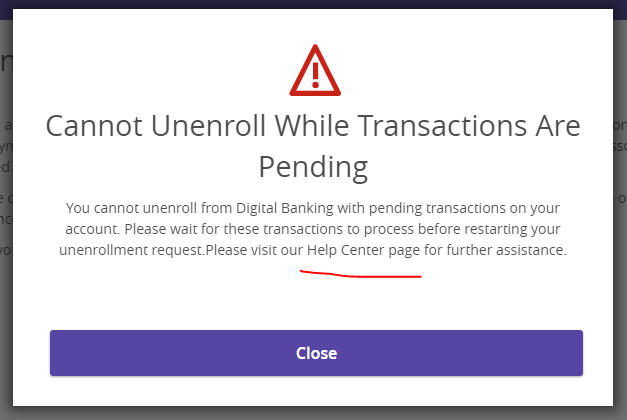
In a Tecton Modal, I would like to include a link to one of our corporate web pages. The modal appears as below:

file

Where the text reads, "Help Center page," the user should be able to navigate to the web page upon clicking the text. The following JavaScipt has been written for this action:

const helpCenterWebLinks = document.querySelectorAll(".help-center-web-link");

helpCenterWebLinks.forEach((link) => {
	link.addEventListener("click", function () {
		const urlRequested = "https://www.randomcu.org/assistance/help/";
		tecton.actions.openURL(urlRequested, {
			showInOverpanel: false,
			nativeBrowserIfInApp: false,
			requiresToken: false,
		});
	});
});

When the time is appropriate, I am showing the modal with this JavaScript:

tecton.actions.showModal({
	title: "Cannot Unenroll While Transactions Are Pending",
	message: 
		"You cannot unenroll from Digital Banking with pending transactions on " +
		"your account. Please wait for these transactions to process before " +
		"restarting your unenrollment request." +
		`Please visit our <span class="web-links help-center-web-link">Help ` +
		`Center page</span> for further assistance.`,
	modalType: "error",
	isBlocking: true,
	close: false,
	msgHasMarkup: true,
});

The following CSS should be styling the link in the modal, too:

.web-links {
  color: hsl(206, 100%, 40%);
  text-decoration-line: underline;
}

.web-links:hover {
  cursor: pointer;
}

The issue that I am having with this method is that neither the CSS nor JavaScript is working when the modal appears. I am assuming that this has to do with the modal not immediately rendering upon the page loading, so the event listener is never put on the modal text.

For working with these modals, what is the best way to assign links within the text in such a way that tection.actions.openURL can be used? How can we edit the style of the text, too, to make it more clear that this is a link?

Posted 2 years ago
Votes Newest

Answers


Hey, Ethan!
Great questions. Thank you for all the description and code snippets, it really helps!

We do have a solution for you when it comes to creating a link in your modal:
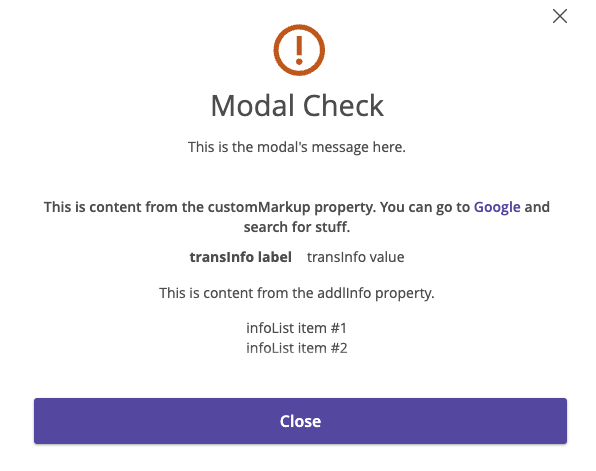
There's a property in the showModal capability called customMarkup that you can use for the sentence containing your link. This will allow HTML to be displayed in the modal's message, so long as it's not a custom web component (we're working to support that soon). You can find details about customMarkup here.

It may be worth utilizing the anchor element in your customMarkup string.
file

Here's the code that I used to creat a modal with a working link to a different website:

tecton.actions.showModal({
	title: 'Modal Check',
	message: `This is the modal's message here.`,
	modalType: 'warning',
	transInfo: [ { label: 'transInfo label', value: 'transInfo value', },  ],
	infoList: [ 'infoList item #1', 'infoList item #2', ],
	addlInfo: 'This is content from the addlInfo property.',
	customMarkup:`<h4>This is content from the customMarkup property.
		You can go to <a href="https://www.google.com">Google</a> and search for stuff.</h4>`,
	close: true,
})

When I tested this, the anchor tag navigated my current tab to Google, even when I added the target="_blank" attribute. That is an unappealing result to me, as I would prefer it opens in a new tab. This may only be solved by utilizing the openURL Tecton action, which means you'll need to find a way to implement the event listener effectively.

You are correct that the element needs to be rendered before you can attach an event listener to its click event. helpCenterWebLinks will be undefined if you run it before the element exists. I would suggest finding a way to add the event listener after you invoke showModal().

119 Views
1 Answer
2 years ago
2 years ago