
Hey, Ethan!
Great questions. Thank you for all the description and code snippets, it really helps!
We do have a solution for you when it comes to creating a link in your modal:
There's a property in the `showModal` capability called `customMarkup` that you can use for the sentence containing your link. This will allow HTML to be displayed in the modal's message, so long as it's not a custom web component (we're working to support that soon). You can find details about `customMarkup` [here](https://tecton.q2developer.com/capabilities/showModal/#arguments).
It may be worth saving yourself the headache of click event listeners attached to a `<span>` by utilizing the [anchor]( https://developer.mozilla.org/en-US/docs/Web/HTML/Element/a) element in your `customMarkup` string.
Here's an example of my modal with an anchor tag to google:

Here's the code that created the modal:
```
tecton.actions.showModal({
title: 'Modal Check',
message: `This is the modal's message here.`,
modalType: 'warning',
transInfo: [ { label: 'transInfo label', value: 'transInfo value', }, ],
infoList: [ 'infoList item #1', 'infoList item #2', ],
addlInfo: 'This is content from the addlInfo property.',
customMarkup:'<h4> This is content from the customMarkup property.
You can go to <a href="https://www.google.com">Google</a> and search for stuff.</h4>',
close: true,
})
```
You are correct that the element needs to be rendered before you can attach an event listener to its click event. `helpCenterWebLinks` will be `undefined` if you run it before the element exists. I would suggest adding the event listeners after you invoke `showModal()`, if you still intend to use event listeners.
Hey, Ethan!
Great questions. Thank you for all the description and code snippets, it really helps!
We do have a solution for you when it comes to creating a link in your modal:
There's a property in the `showModal` capability called `customMarkup` that you can use for the sentence containing your link. This will allow HTML to be displayed in the modal's message, so long as it's not a custom web component (we're working to support that soon). You can find details about `customMarkup` [here](https://tecton.q2developer.com/capabilities/showModal/#arguments).
It may be worth saving yourself the headache of click event listeners attached to a `<span>` by utilizing the [anchor]( https://developer.mozilla.org/en-US/docs/Web/HTML/Element/a) element instead.
Here's an example of my modal with an anchor tag to google:

Here's the code that created the modal:

You are correct that the element needs to be rendered before you can attach an event listener to its click event. `helpCenterWebLinks` will be `undefined` if you run it before the element exists. I would suggest adding the event listeners after you invoke `showModal()`, if you still intend to use event listeners.
How can links be included in Tecton Modals while making use of tecton.actions.openURL?
How can links be included in Tecton Modals while making use of tecton.actions.openURL?
Hey, Ethan!
Great questions. Thank you for all the description and code snippets, it really helps!
We do have a solution for you when it comes to creating a link in your modal:
There's a property in the `showModal` capability called `customMarkup` that you can use for the sentence containing your link. This will allow HTML to be displayed in the modal's message, so long as it's not a custom web component (we're working to support that soon). You can find details about `customMarkup` [here](https://tecton.q2developer.com/capabilities/showModal/#arguments).
It may be worth saving yourself the headache of click event listeners attached to a `<span>` by utilizing the [anchor]( https://developer.mozilla.org/en-US/docs/Web/HTML/Element/a) element instead.
Here's an example of my modal with an anchor tag to google:

Here's the code that created the modal:

You are correct that the element needs to be rendered before you can attach an event listener to its click event. `helpCenterWebLinks` will be `undefined` if you run it before the element exists. I would suggest adding the event listeners after you invoke `showModal()`, if you still intend to use event listeners.
Hey, Ethan!
Great questions. Thank you for all the description and code snippets, it really helps!
We do have a solution for you when it comes to creating a link in your modal:
There's a property in the `showModal` capability called `customMarkup` that you can use for the sentence containing your link. This will allow HTML to be displayed in the modal's message, so long as it's not a custom web component (we're working to support that soon). You can find details about `customMarkup` [here](https://tecton.q2developer.com/capabilities/showModal/#arguments).
It may be worth utilizing the [anchor]( https://developer.mozilla.org/en-US/docs/Web/HTML/Element/a) element in your `customMarkup` string.
Here's the code that I used to creat a modal with a working link to a different website:
```
tecton.actions.showModal({
title: 'Modal Check',
message: `This is the modal's message here.`,
modalType: 'warning',
transInfo: [ { label: 'transInfo label', value: 'transInfo value', }, ],
infoList: [ 'infoList item #1', 'infoList item #2', ],
addlInfo: 'This is content from the addlInfo property.',
customMarkup:`<h4>This is content from the customMarkup property.
You can go to <a href="https://www.google.com">Google</a> and search for stuff.</h4>`,
close: true,
})
```
When I tested this, the anchor tag navigated my current tab to Google, even when I added the `target="_blank"` attribute. That is an unappealing result to me, as I would prefer it opens in a new tab. This may only be solved by utilizing the `openURL` Tecton action, which means you'll need to find a way to implement the event listener effectively.
You are correct that the element needs to be rendered before you can attach an event listener to its click event. `helpCenterWebLinks` will be `undefined` if you run it before the element exists. I would suggest finding a way to add the event listener after you invoke `showModal()`.
Hey, Ethan!
Great questions. Thank you for all the description and code snippets, it really helps!
We do have a solution for you when it comes to creating a link in your modal:
There's a property in the `showModal` capability called `customMarkup` that you can use for the sentence containing your link. This will allow HTML to be displayed in the modal's message, so long as it's not a custom web component (we're working to support that soon). You can find details about `customMarkup` [here](https://tecton.q2developer.com/capabilities/showModal/#arguments).
It may be worth utilizing the [anchor]( https://developer.mozilla.org/en-US/docs/Web/HTML/Element/a) element in your `customMarkup` string.
Here's the code that I used to creat a modal with a working link to a different website:
```
tecton.actions.showModal({
title: 'Modal Check',
message: `This is the modal's message here.`,
modalType: 'warning',
transInfo: [ { label: 'transInfo label', value: 'transInfo value', }, ],
infoList: [ 'infoList item #1', 'infoList item #2', ],
addlInfo: 'This is content from the addlInfo property.',
customMarkup:`<h4>This is content from the customMarkup property.
You can go to <a href="https://www.google.com">Google</a> and search for stuff.</h4>`,
close: true,
})
```
When I tested this, the anchor tag navigated my current tab to Google, even when I added the `target="_blank"` attribute. That is an unappealing result to me, as I would prefer it opens in a new tab. This may only be solved by utilizing the `openURL` Tecton action, which means you'll need to find a way to implement the event listener effectively.
You are correct that the element needs to be rendered before you can attach an event listener to its click event. `helpCenterWebLinks` will be `undefined` if you run it before the element exists. I would suggest finding a way to add the event listener after you invoke `showModal()`.
Hey, Ethan!
Great questions. Thank you for all the description and code snippets, it really helps!
We do have a solution for you when it comes to creating a link in your modal:
There's a property in the `showModal` capability called `customMarkup` that you can use for the sentence containing your link. This will allow HTML to be displayed in the modal's message, so long as it's not a custom web component (we're working to support that soon). You can find details about `customMarkup` [here](https://tecton.q2developer.com/capabilities/showModal/#arguments).
It may be worth utilizing the [anchor]( https://developer.mozilla.org/en-US/docs/Web/HTML/Element/a) element in your `customMarkup` string.
Here's the code that I used to creat a modal with a working link to a different website:
```
tecton.actions.showModal({
title: 'Modal Check',
message: `This is the modal's message here.`,
modalType: 'warning',
transInfo: [ { label: 'transInfo label', value: 'transInfo value', }, ],
infoList: [ 'infoList item #1', 'infoList item #2', ],
addlInfo: 'This is content from the addlInfo property.',
customMarkup:`<h4>This is content from the customMarkup property.
You can go to <a href="https://www.google.com">Google</a> and search for stuff.</h4>`,
close: true,
})
```
When I tested this, the anchor tag navigated my current tab to Google, even when I added the `target="_blank"` attribute. That is an unappealing result to me, as I would prefer it opens in a new tab. This may only be solved by utilizing the `openURL` Tecton action, which means you'll need to find a way to implement the event listener effevtively.
You are correct that the element needs to be rendered before you can attach an event listener to its click event. `helpCenterWebLinks` will be `undefined` if you run it before the element exists. I would suggest finding a way to add the event listener after you invoke `showModal()`.
Hey, Ethan!
Great questions. Thank you for all the description and code snippets, it really helps!
We do have a solution for you when it comes to creating a link in your modal:
There's a property in the `showModal` capability called `customMarkup` that you can use for the sentence containing your link. This will allow HTML to be displayed in the modal's message, so long as it's not a custom web component (we're working to support that soon). You can find details about `customMarkup` [here](https://tecton.q2developer.com/capabilities/showModal/#arguments).
It may be worth utilizing the [anchor]( https://developer.mozilla.org/en-US/docs/Web/HTML/Element/a) element in your `customMarkup` string.
Here's the code that I used to creat a modal with a working link to a different website:
```
tecton.actions.showModal({
title: 'Modal Check',
message: `This is the modal's message here.`,
modalType: 'warning',
transInfo: [ { label: 'transInfo label', value: 'transInfo value', }, ],
infoList: [ 'infoList item #1', 'infoList item #2', ],
addlInfo: 'This is content from the addlInfo property.',
customMarkup:`<h4>This is content from the customMarkup property.
You can go to <a href="https://www.google.com">Google</a> and search for stuff.</h4>`,
close: true,
})
```
When I tested this, the anchor tag navigated my current tab to Google, even when I added the `target="_blank"` attribute. That is an unappealing result to me, as I would prefer it opens in a new tab. This may only be solved by utilizing the `openURL` Tecton action, which means you'll need to find a way to implement the event listener effevtively.
You are correct that the element needs to be rendered before you can attach an event listener to its click event. `helpCenterWebLinks` will be `undefined` if you run it before the element exists. I would suggest finding a way to add the event listener after you invoke `showModal()`.
Hey, Ethan!
Great questions. Thank you for all the description and code snippets, it really helps!
We do have a solution for you when it comes to creating a link in your modal:
There's a property in the `showModal` capability called `customMarkup` that you can use for the sentence containing your link. This will allow HTML to be displayed in the modal's message, so long as it's not a custom web component (we're working to support that soon). You can find details about `customMarkup` [here](https://tecton.q2developer.com/capabilities/showModal/#arguments).
It may be worth utilizing the [anchor]( https://developer.mozilla.org/en-US/docs/Web/HTML/Element/a) element in your `customMarkup` string.
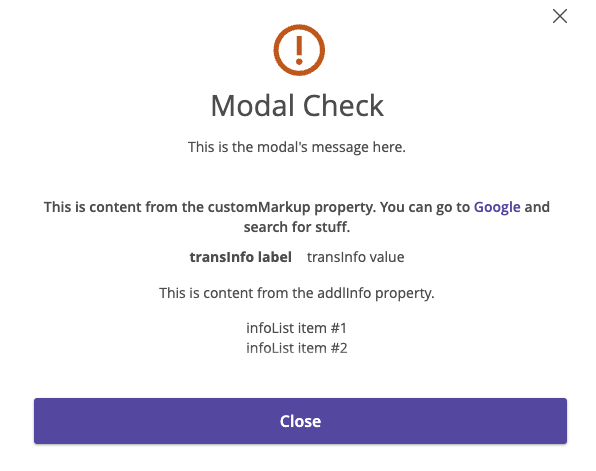
Here's the code that I used to creat a modal with a working link to a different website:
```
tecton.actions.showModal({
title: 'Modal Check',
message: `This is the modal's message here.`,
modalType: 'warning',
transInfo: [ { label: 'transInfo label', value: 'transInfo value', }, ],
infoList: [ 'infoList item #1', 'infoList item #2', ],
addlInfo: 'This is content from the addlInfo property.',
customMarkup:`<h4>This is content from the customMarkup property.
You can go to <a href="https://www.google.com">Google</a> and search for stuff.</h4>`,
close: true,
})
```
When I tested this, the anchor tag navigated my current tab to Google, even when I added the `target="_blank"` attribute. That is an unappealing result to me, as I would prefer it opens in a new tab. This may only be solved by utilizing the `openURL` Tecton action, which means you'll need to find a way to implement the event listener effectively.
You are correct that the element needs to be rendered before you can attach an event listener to its click event. `helpCenterWebLinks` will be `undefined` if you run it before the element exists. I would suggest finding a way to add the event listener after you invoke `showModal()`.
Hey, Ethan!
Great questions. Thank you for all the description and code snippets, it really helps!
We do have a solution for you when it comes to creating a link in your modal:
There's a property in the `showModal` capability called `customMarkup` that you can use for the sentence containing your link. This will allow HTML to be displayed in the modal's message, so long as it's not a custom web component (we're working to support that soon). You can find details about `customMarkup` [here](https://tecton.q2developer.com/capabilities/showModal/#arguments).
It may be worth utilizing the [anchor]( https://developer.mozilla.org/en-US/docs/Web/HTML/Element/a) element in your `customMarkup` string.

Here's the code that I used to creat a modal with a working link to a different website:
```
tecton.actions.showModal({
title: 'Modal Check',
message: `This is the modal's message here.`,
modalType: 'warning',
transInfo: [ { label: 'transInfo label', value: 'transInfo value', }, ],
infoList: [ 'infoList item #1', 'infoList item #2', ],
addlInfo: 'This is content from the addlInfo property.',
customMarkup:`<h4>This is content from the customMarkup property.
You can go to <a href="https://www.google.com">Google</a> and search for stuff.</h4>`,
close: true,
})
```
When I tested this, the anchor tag navigated my current tab to Google, even when I added the `target="_blank"` attribute. That is an unappealing result to me, as I would prefer it opens in a new tab. This may only be solved by utilizing the `openURL` Tecton action, which means you'll need to find a way to implement the event listener effectively.
You are correct that the element needs to be rendered before you can attach an event listener to its click event. `helpCenterWebLinks` will be `undefined` if you run it before the element exists. I would suggest finding a way to add the event listener after you invoke `showModal()`.
Hey, Ethan!
Great questions. Thank you for all the description and code snippets, it really helps!
We do have a solution for you when it comes to creating a link in your modal:
There's a property in the `showModal` capability called `customMarkup` that you can use for the sentence containing your link. This will allow HTML to be displayed in the modal's message, so long as it's not a custom web component (we're working to support that soon). You can find details about `customMarkup` [here](https://tecton.q2developer.com/capabilities/showModal/#arguments).
It may be worth utilizing the [anchor]( https://developer.mozilla.org/en-US/docs/Web/HTML/Element/a) element in your `customMarkup` string.
Here's the code that I used to creat a modal with a working link to a different website:
```
tecton.actions.showModal({
title: 'Modal Check',
message: `This is the modal's message here.`,
modalType: 'warning',
transInfo: [ { label: 'transInfo label', value: 'transInfo value', }, ],
infoList: [ 'infoList item #1', 'infoList item #2', ],
addlInfo: 'This is content from the addlInfo property.',
customMarkup:'<h4>This is content from the customMarkup property.
You can go to <a href="https://www.google.com">Google</a> and search for stuff.</h4>',
close: true,
})
```
When I tested this, the anchor tag navigated my current tab to Google, even when I added the `target="_blank"` attribute. That is an unappealing result to me. This may only be solved by utilizing the `openURL` Tecton action, which means you'll need to find a way to implement the event listener effevtively.
You are correct that the element needs to be rendered before you can attach an event listener to its click event. `helpCenterWebLinks` will be `undefined` if you run it before the element exists. I would suggest finding a way to add the event listener after you invoke `showModal()`.
Hey, Ethan!
Great questions. Thank you for all the description and code snippets, it really helps!
We do have a solution for you when it comes to creating a link in your modal:
There's a property in the `showModal` capability called `customMarkup` that you can use for the sentence containing your link. This will allow HTML to be displayed in the modal's message, so long as it's not a custom web component (we're working to support that soon). You can find details about `customMarkup` [here](https://tecton.q2developer.com/capabilities/showModal/#arguments).
It may be worth utilizing the [anchor]( https://developer.mozilla.org/en-US/docs/Web/HTML/Element/a) element in your `customMarkup` string.
Here's the code that I used to creat a modal with a working link to a different website:
```
tecton.actions.showModal({
title: 'Modal Check',
message: `This is the modal's message here.`,
modalType: 'warning',
transInfo: [ { label: 'transInfo label', value: 'transInfo value', }, ],
infoList: [ 'infoList item #1', 'infoList item #2', ],
addlInfo: 'This is content from the addlInfo property.',
customMarkup:'<h4>This is content from the customMarkup property.
You can go to <a href="https://www.google.com">Google</a> and search for stuff.</h4>',
close: true,
})
```
When I tested this, the anchor tag navigated my current tab to Google, even when I added the `target="_blank"` attribute. That is an unappealing result to me. This may only be solved by utilizing the `openURL` Tecton action, which means you'll need to find a way to implement the event listener effevtively.
You are correct that the element needs to be rendered before you can attach an event listener to its click event. `helpCenterWebLinks` will be `undefined` if you run it before the element exists. I would suggest finding a way to add the event listener after you invoke `showModal()`.
Hey, Ethan!
Great questions. Thank you for all the description and code snippets, it really helps!
We do have a solution for you when it comes to creating a link in your modal:
There's a property in the `showModal` capability called `customMarkup` that you can use for the sentence containing your link. This will allow HTML to be displayed in the modal's message, so long as it's not a custom web component (we're working to support that soon). You can find details about `customMarkup` [here](https://tecton.q2developer.com/capabilities/showModal/#arguments).
It may be worth saving yourself the headache of click event listeners attached to a `<span>` by utilizing the [anchor]( https://developer.mozilla.org/en-US/docs/Web/HTML/Element/a) element in your `customMarkup` string.
Here's an example of my modal with an anchor tag to google:

Here's the code that created the modal:

You are correct that the element needs to be rendered before you can attach an event listener to its click event. `helpCenterWebLinks` will be `undefined` if you run it before the element exists. I would suggest adding the event listeners after you invoke `showModal()`, if you still intend to use event listeners.
Hey, Ethan!
Great questions. Thank you for all the description and code snippets, it really helps!
We do have a solution for you when it comes to creating a link in your modal:
There's a property in the `showModal` capability called `customMarkup` that you can use for the sentence containing your link. This will allow HTML to be displayed in the modal's message, so long as it's not a custom web component (we're working to support that soon). You can find details about `customMarkup` [here](https://tecton.q2developer.com/capabilities/showModal/#arguments).
It may be worth saving yourself the headache of click event listeners attached to a `<span>` by utilizing the [anchor]( https://developer.mozilla.org/en-US/docs/Web/HTML/Element/a) element in your `customMarkup` string.
Here's an example of my modal with an anchor tag to google:

Here's the code that created the modal:

You are correct that the element needs to be rendered before you can attach an event listener to its click event. `helpCenterWebLinks` will be `undefined` if you run it before the element exists. I would suggest adding the event listeners after you invoke `showModal()`, if you still intend to use event listeners.
Hey, Ethan!
Great questions. Thank you for all the description and code snippets, it really helps!
We do have a solution for you when it comes to creating a link in your modal:
There's a property in the `showModal` capability called `customMarkup` that you can use for the sentence containing your link. This will allow HTML to be displayed in the modal's message, so long as it's not a custom web component (we're working to support that soon). You can find details about `customMarkup` [here](https://tecton.q2developer.com/capabilities/showModal/#arguments).
It may be worth utilizing the [anchor]( https://developer.mozilla.org/en-US/docs/Web/HTML/Element/a) element in your `customMarkup` string.
Here's the code that I used to creat a modal with a working link to a different website:
```
tecton.actions.showModal({
title: 'Modal Check',
message: `This is the modal's message here.`,
modalType: 'warning',
transInfo: [ { label: 'transInfo label', value: 'transInfo value', }, ],
infoList: [ 'infoList item #1', 'infoList item #2', ],
addlInfo: 'This is content from the addlInfo property.',
customMarkup:'<h4>This is content from the customMarkup property.
You can go to <a href="https://www.google.com">Google</a> and search for stuff.</h4>',
close: true,
})
```
When I tested this, the anchor tag navigated my current tab to Google, even when I added the `target="_blank"` attribute. That is an unappealing result to me, as I would prefer it opens in a new tab. This may only be solved by utilizing the `openURL` Tecton action, which means you'll need to find a way to implement the event listener effevtively.
You are correct that the element needs to be rendered before you can attach an event listener to its click event. `helpCenterWebLinks` will be `undefined` if you run it before the element exists. I would suggest finding a way to add the event listener after you invoke `showModal()`.
How can links be included in Tecton Modals while making use of tecton.actions.openURL?
Hey, Ethan!
Great questions. Thank you for all the description and code snippets, it really helps!
We do have a solution for you when it comes to creating a link in your modal:
There's a property in the `showModal` capability called `customMarkup` that you can use for the sentence containing your link. This will allow HTML to be displayed in the modal's message, so long as it's not a custom web component (we're working to support that soon). You can find details about `customMarkup` [here](https://tecton.q2developer.com/capabilities/showModal/#arguments).
It may be worth utilizing the [anchor]( https://developer.mozilla.org/en-US/docs/Web/HTML/Element/a) element in your `customMarkup` string.
Here's the code that I used to creat a modal with a working link to a different website:
```
tecton.actions.showModal({
title: 'Modal Check',
message: `This is the modal's message here.`,
modalType: 'warning',
transInfo: [ { label: 'transInfo label', value: 'transInfo value', }, ],
infoList: [ 'infoList item #1', 'infoList item #2', ],
addlInfo: 'This is content from the addlInfo property.',
customMarkup:'<h4>This is content from the customMarkup property.
You can go to <a href="https://www.google.com">Google</a> and search for stuff.</h4>',
close: true,
})
```
When I tested this, the anchor tag navigated my current tab to Google, even when I added the `target="_blank"` attribute. That is an unappealing result to me, as I would prefer it opens in a new tab. This may only be solved by utilizing the `openURL` Tecton action, which means you'll need to find a way to implement the event listener effevtively.
You are correct that the element needs to be rendered before you can attach an event listener to its click event. `helpCenterWebLinks` will be `undefined` if you run it before the element exists. I would suggest finding a way to add the event listener after you invoke `showModal()`.