Examples: query, "exact match", wildcard*, wild?ard, wild*rd
Fuzzy search: cake~ (finds cakes, bake)
Term boost: "red velvet"^4, chocolate^2
Field grouping: tags:(+work -"fun-stuff")
Escape special characters +-&|!(){}[]^"~*?:\ - e.g. \+ \* \!
Range search: properties.timestamp:[1587729413488 TO *] (inclusive), properties.title:{A TO Z}(excluding A and Z)
Combinations: chocolate AND vanilla, chocolate OR vanilla, (chocolate OR vanilla) NOT "vanilla pudding"
Field search: properties.title:"The Title" AND text
 
Answered
q2-calendar/q2-select error not displaying in UI

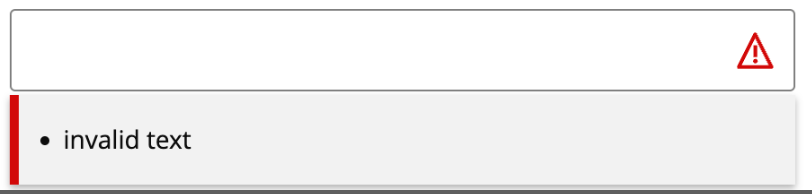
I notice that for example, if you define an input field with an error attribute like the below, you are able to see the error text.
file

Code:

<Q2Input
			name=“test”
			type=“text”
			label=“input”
			errors={[‘invalid text’]}></Q2Input>

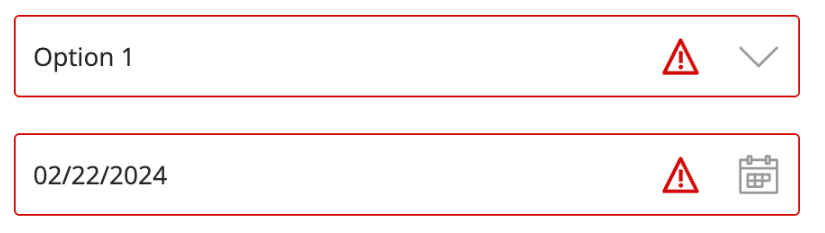
However, for q2-calendar/q2-select you do not see the error text below. What can I do to make the error text show up?
file

Code:

</Q2Input>
<Q2Select
		name=“test-select”
		errors={[‘invalid select’]}
>
		<Q2Option key=“1” value=“1" aria-selected=“false”>Option 1</Q2Option>
</Q2Select>

<Q2Calendar
		name=“test-calendar”
		errors={[‘invalid calendar’]}
>
</Q2Calendar>
Votes Newest

Answers


Hello!
Great question! This behavior is by design.

When a q2-input is in an error state and active, it will display an error message for the user. When it is in an error state, but not the active element, the error message disappears, and the red border and error icon remain to indicate an error.

For q2-calendar and q2-select, due to them both opening a popover when active, we did not include the error message because of the UI collisions it could cause. Instead, they only show the red border and error icon when in an error state.

If you want to implement error messages for those elements, a possible workaround would be to put a q2-message component on the page with the error messages from those components in it. You'll have to write some code that will manually extract the error messages from those components and put them into the q2-message component.

I hope this help!
If you need more assistance, please don't hesitate to fill out a support ticket.

95 Views
1 Answer
2 years ago
2 years ago