
I notice that for example, if you define an input field with an error attribute like the below, you are able to see the error text.
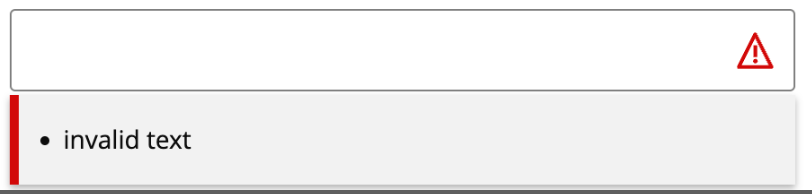
Code:
```
<Q2Input
name=“test”
type=“text”
label=“input”
errors={[‘invalid text’]}></Q2Input>
```
However, for q2-calendar/q2-select you do not see the error text below. What can I do to make the error text show up?
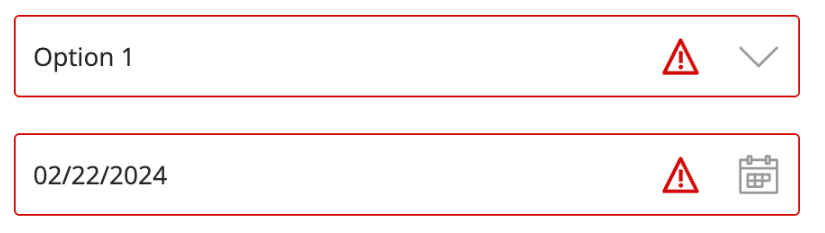
Code:
```
</Q2Input>
<Q2Select
name=“test-select”
errors={[‘invalid select’]}
>
<Q2Option key=“1” value=“1" aria-selected=“false”>Option 1</Q2Option>
</Q2Select>
<Q2Calendar
name=“test-calendar”
errors={[‘invalid calendar’]}
>
</Q2Calendar>
```
I notice that for example, if you define an input field with an error attribute like the below, you are able to see the error text.

Code:
```
<Q2Input
name=“test”
type=“text”
label=“input”
errors={[‘invalid text’]}></Q2Input>
```
However, for q2-calendar/q2-select you do not see the error text below:

Code:
```
</Q2Input>
<Q2Select
name=“test-select”
errors={[‘invalid select’]}
>
<Q2Option key=“1” value=“1" aria-selected=“false”>Option 1</Q2Option>
</Q2Select>
<Q2Calendar
name=“test-calendar”
errors={[‘invalid calendar’]}
>
</Q2Calendar>
```
q2-calendar/q2-select error not displaying in UI
I notice that for example, if you define an input field with an error attribute like the below, you are able to see the error text.

Code:
```
<Q2Input
name=“test”
type=“text”
label=“input”
errors={[‘invalid text’]}></Q2Input>
```
However, for q2-calendar/q2-select you do not see the error text below:

Code:
```
</Q2Input>
<Q2Select
name=“test-select”
errors={[‘invalid select’]}
>
<Q2Option key=“1” value=“1" aria-selected=“false”>Option 1</Q2Option>
</Q2Select>
<Q2Calendar
name=“test-calendar”
errors={[‘invalid calendar’]}
>
</Q2Calendar>
```