Hi Negar,
What we do is we add a nav node for the new developer and then install individual forms under it. This allows us to work simultaneously.
So for example in the CLI you would do the following:
> q2 db add_nav_node
Which Type of Nav Node?

    1) Route
    2) DirectLink

Please make a selection and press Return: 1
Route

Which menu should this nav node live under? (Leave blank to insert at top level nav)
    --Online Top Level Navigation Menu--

    1) Home
    2) Home
    3) Develoer One
    4) Develoer Two
    5) Develoer Three
    6) Develoer Four
    7) not used
    8) Messages
    9) Tranfers & Payments
    10) not used
    11) Transactions
    12) Commercial

    Page 1 of 3. Select 'n' for next page.

Please make a selection and press Return:
-
---Online Top Level Navigation Menu----
1) -> here
        Home
2) -> here
        Home
3) -> here
        Developer One
4) -> here
        Developer Two
5) -> here
        Developer Three
6) -> here
        Developer Four
7) -> here
        not used
8) -> here
        Messages
9) -> here
        Tranfers & Payments
10) -> here
        not used
11) -> here
        Transactions
12) -> here
        Commercial
13) -> here
        not used
14) -> here
        not used
15) -> here
        Branches
16) -> here
        Services
17) -> here
        News
18) -> here
        not used
19) -> here
        not used
20) -> here
        Reports
21) -> here
        Settings
22) -> here
        not used
23) -> here
        Services
24) -> here
        Help
25) -> here
        not used
26) -> here
        Settings
27) -> here
        Home
28) -> here
        Transfer
29) -> here
        Deposit Check
30) -> here
        Bill Pay
31) -> here
        Activity Center
32) -> here
        Messages
33) -> here
        Branches
34) -> here

Where should this nav node appear in the submenu?: 34
What would you like to put in the Route column?: test-developer
Which Icon should be displayed? (Leave blank for default)
    --Current list of icons--

    1) landing-page
    2) message-center
    3) transactions
    4) payments
    5) commercial
    6) branches
    7) services
    8) news
    9) reports
    10) settings
    11) help
    12) logoff

Please make a selection and press Return: 5
commercial

Nav item text?: Test Developer

Device Bitflag? [7]:

Route Params? (Formatted as a json string):

Enabled? [1]:
2022-02-15T13:37:50.028 root            INFO     Calling invalidate on 1 HQs: ['http://dev-01.q2developer.com/sdk/visions/hq']
2022-02-15T13:37:52.932 root            INFO     Ardent cache refreshed
Success
Then you install your form using q2 install so that it is pointing to the correct user's port and add it to nav under the new parent node:
> q2 add_to_nav
Which extension would you like to add to navigation menu?

    1) FICOIntegration
    2) ENotices
    3) LoanSkipPayment
    4) MicronotesCrossSell
    5) EmergencySkipPayment
    6) ReferAFriend
    7) tectonWidget_2
    8) tectonWidget_account_card_dashboard
    9) RegEOverdraftPrivilege
    10) TectonSsrFico
    11) MortgageTracker
    12) sandbox

    Page 1 of 4. Select 'n' for next page.

Please make a selection and press Return: 11
MortgageTracker

Which Navigation Tree would you like to use?

    1) UUX
    2) UUX_NavLandingPages

Please make a selection and press Return [1]:

Which menu should this nav node live under? (Leave blank to insert at top level nav)
    --Online Top Level Navigation Menu--

    1) Home
    2) Developer One
    3) Developer Two
    4) Developer Three
    5) Developer Four
    6) Messages
    7) Transactions
    8) Commercial
    9) Branches
    10) News
    11) Reports
    12) Services

    Page 1 of 2. Select 'n' for next page.

Please make a selection and press Return: n

Which menu should this nav node live under? (Leave blank to insert at top level nav)
    --Online Top Level Navigation Menu--

    1) Help
    2) Settings
    3) Test Developer

    Page 2 of 2. Select 'p' for previous page.

Please make a selection and press Return: 3
Test Developer

--Test Developer--
1) -> here

Where should this nav node appear in the submenu?: 1
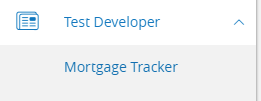
Then you see it installed under the nav node and it will point to your specific port: