
Hi Negar,
What we do is we add a nav node for the new developer and then install individual forms under it. This allows us to work simultaneously.
So for example in the CLI you would do the following:
```
> q2 db add_nav_node
Which Type of Nav Node?
1) Route
2) DirectLink
Please make a selection and press Return: 1
Route
Which menu should this nav node live under? (Leave blank to insert at top level nav)
--Online Top Level Navigation Menu--
1) Home
2) Home
3) Develoer One
4) Develoer Two
5) Develoer Three
6) Develoer Four
7) not used
8) Messages
9) Tranfers & Payments
10) not used
11) Transactions
12) Commercial
Page 1 of 3. Select 'n' for next page.
Please make a selection and press Return:
-
---Online Top Level Navigation Menu----
1) -> here
Home
2) -> here
Home
3) -> here
Developer One
4) -> here
Developer Two
5) -> here
Developer Three
6) -> here
Developer Four
7) -> here
not used
8) -> here
Messages
9) -> here
Tranfers & Payments
10) -> here
not used
11) -> here
Transactions
12) -> here
Commercial
13) -> here
not used
14) -> here
not used
15) -> here
Branches
16) -> here
Services
17) -> here
News
18) -> here
not used
19) -> here
not used
20) -> here
Reports
21) -> here
Settings
22) -> here
not used
23) -> here
Services
24) -> here
Help
25) -> here
not used
26) -> here
Settings
27) -> here
Home
28) -> here
Transfer
29) -> here
Deposit Check
30) -> here
Bill Pay
31) -> here
Activity Center
32) -> here
Messages
33) -> here
Branches
34) -> here
Where should this nav node appear in the submenu?: 34
What would you like to put in the Route column?: test-developer
Which Icon should be displayed? (Leave blank for default)
--Current list of icons--
1) landing-page
2) message-center
3) transactions
4) payments
5) commercial
6) branches
7) services
8) news
9) reports
10) settings
11) help
12) logoff
Please make a selection and press Return: 5
commercial
Nav item text?: Test Developer
Device Bitflag? [7]:
Route Params? (Formatted as a json string):
Enabled? [1]:
2022-02-15T13:37:50.028 root INFO Calling invalidate on 1 HQs: ['http://dev-01.q2developer.com/sdk/visions/hq']
2022-02-15T13:37:52.932 root INFO Ardent cache refreshed
Success
```
Then you install your form using `q2 install` so that it is pointing to the correct user's port and add it to nav under the new parent node:
```
> q2 add_to_nav
Which extension would you like to add to navigation menu?
1) FICOIntegration
2) ENotices
3) LoanSkipPayment
4) MicronotesCrossSell
5) EmergencySkipPayment
6) ReferAFriend
7) tectonWidget_2
8) tectonWidget_account_card_dashboard
9) RegEOverdraftPrivilege
10) TectonSsrFico
11) MortgageTracker
12) sandbox
Page 1 of 4. Select 'n' for next page.
Please make a selection and press Return: 11
MortgageTracker
Which Navigation Tree would you like to use?
1) UUX
2) UUX_NavLandingPages
Please make a selection and press Return [1]:
Which menu should this nav node live under? (Leave blank to insert at top level nav)
--Online Top Level Navigation Menu--
1) Home
2) Developer One
3) Developer Two
4) Developer Three
5) Developer Four
6) Messages
7) Transactions
8) Commercial
9) Branches
10) News
11) Reports
12) Services
Page 1 of 2. Select 'n' for next page.
Please make a selection and press Return: n
Which menu should this nav node live under? (Leave blank to insert at top level nav)
--Online Top Level Navigation Menu--
1) Help
2) Settings
3) Test Developer
Page 2 of 2. Select 'p' for previous page.
Please make a selection and press Return: 3
Test Developer
--Test Developer--
1) -> here
Where should this nav node appear in the submenu?: 1
```
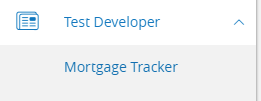
Then you see it installed under the nav node and it will point to your specific port:
Hi Negar,
What we do is we add a nav node for the new developer and then install individual forms under it. This allows us to work simultaneously.
So for example in the CLI you would do the following:
```
> q2 db add_nav_node
Which Type of Nav Node?
1) Route
2) DirectLink
Please make a selection and press Return: 1
Route
Which menu should this nav node live under? (Leave blank to insert at top level nav)
--Online Top Level Navigation Menu--
1) Home
2) Home
3) Develoer One
4) Develoer Two
5) Develoer Three
6) Develoer Four
7) not used
8) Messages
9) Tranfers & Payments
10) not used
11) Transactions
12) Commercial
Page 1 of 3. Select 'n' for next page.
Please make a selection and press Return:
-
---Online Top Level Navigation Menu----
1) -> here
Home
2) -> here
Home
3) -> here
Developer One
4) -> here
Developer Two
5) -> here
Developer Three
6) -> here
Developer Four
7) -> here
not used
8) -> here
Messages
9) -> here
Tranfers & Payments
10) -> here
not used
11) -> here
Transactions
12) -> here
Commercial
13) -> here
not used
14) -> here
not used
15) -> here
Branches
16) -> here
Services
17) -> here
News
18) -> here
not used
19) -> here
not used
20) -> here
Reports
21) -> here
Settings
22) -> here
not used
23) -> here
Services
24) -> here
Help
25) -> here
not used
26) -> here
Settings
27) -> here
Home
28) -> here
Transfer
29) -> here
Deposit Check
30) -> here
Bill Pay
31) -> here
Activity Center
32) -> here
Messages
33) -> here
Branches
34) -> here
Where should this nav node appear in the submenu?: 34
What would you like to put in the Route column?: test-developer
Which Icon should be displayed? (Leave blank for default)
--Current list of icons--
1) landing-page
2) message-center
3) transactions
4) payments
5) commercial
6) branches
7) services
8) news
9) reports
10) settings
11) help
12) logoff
Please make a selection and press Return: 5
commercial
Nav item text?: Test Developer
Device Bitflag? [7]:
Route Params? (Formatted as a json string):
Enabled? [1]:
2022-02-15T13:37:50.028 root INFO Calling invalidate on 1 HQs: ['http://dev-01.q2developer.com/sdk/visions/hq']
2022-02-15T13:37:52.932 root INFO Ardent cache refreshed
Success
```
Then you install your form and add it to nav under the new parent node:
```
> q2 add_to_nav
Which extension would you like to add to navigation menu?
1) FICOIntegration
2) ENotices
3) LoanSkipPayment
4) MicronotesCrossSell
5) EmergencySkipPayment
6) ReferAFriend
7) tectonWidget_2
8) tectonWidget_account_card_dashboard
9) RegEOverdraftPrivilege
10) TectonSsrFico
11) MortgageTracker
12) sandbox
Page 1 of 4. Select 'n' for next page.
Please make a selection and press Return: 11
MortgageTracker
Which Navigation Tree would you like to use?
1) UUX
2) UUX_NavLandingPages
Please make a selection and press Return [1]:
Which menu should this nav node live under? (Leave blank to insert at top level nav)
--Online Top Level Navigation Menu--
1) Home
2) Developer One
3) Developer Two
4) Developer Three
5) Developer Four
6) Messages
7) Transactions
8) Commercial
9) Branches
10) News
11) Reports
12) Services
Page 1 of 2. Select 'n' for next page.
Please make a selection and press Return: n
Which menu should this nav node live under? (Leave blank to insert at top level nav)
--Online Top Level Navigation Menu--
1) Help
2) Settings
3) Test Developer
Page 2 of 2. Select 'p' for previous page.
Please make a selection and press Return: 3
Test Developer
--Test Developer--
1) -> here
Where should this nav node appear in the submenu?: 1
```
Then you see it installed under the nav node and it will point to your specific port:

How to have more than one user under one stack name
Hi Negar,
What we do is we add a nav node for the new developer and then install individual forms under it. This allows us to work simultaneously.
So for example in the CLI you would do the following:
```
> q2 db add_nav_node
Which Type of Nav Node?
1) Route
2) DirectLink
Please make a selection and press Return: 1
Route
Which menu should this nav node live under? (Leave blank to insert at top level nav)
--Online Top Level Navigation Menu--
1) Home
2) Home
3) Develoer One
4) Develoer Two
5) Develoer Three
6) Develoer Four
7) not used
8) Messages
9) Tranfers & Payments
10) not used
11) Transactions
12) Commercial
Page 1 of 3. Select 'n' for next page.
Please make a selection and press Return:
-
---Online Top Level Navigation Menu----
1) -> here
Home
2) -> here
Home
3) -> here
Developer One
4) -> here
Developer Two
5) -> here
Developer Three
6) -> here
Developer Four
7) -> here
not used
8) -> here
Messages
9) -> here
Tranfers & Payments
10) -> here
not used
11) -> here
Transactions
12) -> here
Commercial
13) -> here
not used
14) -> here
not used
15) -> here
Branches
16) -> here
Services
17) -> here
News
18) -> here
not used
19) -> here
not used
20) -> here
Reports
21) -> here
Settings
22) -> here
not used
23) -> here
Services
24) -> here
Help
25) -> here
not used
26) -> here
Settings
27) -> here
Home
28) -> here
Transfer
29) -> here
Deposit Check
30) -> here
Bill Pay
31) -> here
Activity Center
32) -> here
Messages
33) -> here
Branches
34) -> here
Where should this nav node appear in the submenu?: 34
What would you like to put in the Route column?: test-developer
Which Icon should be displayed? (Leave blank for default)
--Current list of icons--
1) landing-page
2) message-center
3) transactions
4) payments
5) commercial
6) branches
7) services
8) news
9) reports
10) settings
11) help
12) logoff
Please make a selection and press Return: 5
commercial
Nav item text?: Test Developer
Device Bitflag? [7]:
Route Params? (Formatted as a json string):
Enabled? [1]:
2022-02-15T13:37:50.028 root INFO Calling invalidate on 1 HQs: ['http://dev-01.q2developer.com/sdk/visions/hq']
2022-02-15T13:37:52.932 root INFO Ardent cache refreshed
Success
```
Then you install your form and add it to nav under the new parent node:
```
> q2 add_to_nav
Which extension would you like to add to navigation menu?
1) FICOIntegration
2) ENotices
3) LoanSkipPayment
4) MicronotesCrossSell
5) EmergencySkipPayment
6) ReferAFriend
7) tectonWidget_2
8) tectonWidget_account_card_dashboard
9) RegEOverdraftPrivilege
10) TectonSsrFico
11) MortgageTracker
12) sandbox
Page 1 of 4. Select 'n' for next page.
Please make a selection and press Return: 11
MortgageTracker
Which Navigation Tree would you like to use?
1) UUX
2) UUX_NavLandingPages
Please make a selection and press Return [1]:
Which menu should this nav node live under? (Leave blank to insert at top level nav)
--Online Top Level Navigation Menu--
1) Home
2) Developer One
3) Developer Two
4) Developer Three
5) Developer Four
6) Messages
7) Transactions
8) Commercial
9) Branches
10) News
11) Reports
12) Services
Page 1 of 2. Select 'n' for next page.
Please make a selection and press Return: n
Which menu should this nav node live under? (Leave blank to insert at top level nav)
--Online Top Level Navigation Menu--
1) Help
2) Settings
3) Test Developer
Page 2 of 2. Select 'p' for previous page.
Please make a selection and press Return: 3
Test Developer
--Test Developer--
1) -> here
Where should this nav node appear in the submenu?: 1
```
Then you see it installed under the nav node and it will point to your specific port:
