
Hi Alan, can you locate your source code so I can investigate it on my end ?
I've tested and it worked just fine with code snippet in the tecton document.
Thanks
Alex
https://cdn1.onlineaccess1.com/cdn/base/tecton/v1.15.1/Documentation/index.html#/ui/q2-tab-container
```
<q2-tab-container name="tab-container" value="tab3">
<q2-tab-pane name="tab-container" value="tab1" label="Step 1" badge-count="1">
<h3>Tab 1</h3>
<p>This stepper has a total of 5 steps. This is step 1.</p>
</q2-tab-pane>
<q2-tab-pane name="tab-container" value="tab2" label="Step 2" badge-count="2">
<h3>Tab 2</h3>
<p>This stepper has a total of 5 steps. This is step 2.</p>
</q2-tab-pane>
<q2-tab-pane name="tab-container" value="tab3" label="Step 3" selected badge-count="3">
<h3>Tab 3</h3>
<p>This stepper has a total of 5 steps. This is step 3.</p>
</q2-tab-pane>
<q2-tab-pane name="tab-container" value="tab4" label="Step 4" badge-count="4">
<h3>Tab 4</h3>
<p>This stepper has a total of 5 steps. This is step 4.</p>
</q2-tab-pane>
<q2-tab-pane name="tab-container" value="tab5" label="Step 5" badge-count="5">
<h3>Tab 5</h3>
<p>This stepper has a total of 5 steps. This is step 5.</p>
</q2-tab-pane>
</q2-tab-container>
```
Hi Alan, can you locate your source code so I can investigate it on my end ?
I've tested and it worked just fine with code snippet in the tecton document.
Thanks
Alex
https://cdn1.onlineaccess1.com/cdn/base/tecton/v1.15.1/Documentation/index.html#/ui/q2-tab-container
```
<q2-tab-container name="tab-container" value="tab3">
<q2-tab-pane name="tab-container" value="tab1" label="Step 1" badge-count="1">
<h3>Tab 1</h3>
<p>This stepper has a total of 5 steps. This is step 1.</p>
</q2-tab-pane>
<q2-tab-pane name="tab-container" value="tab2" label="Step 2" badge-count="2">
<h3>Tab 2</h3>
<p>This stepper has a total of 5 steps. This is step 2.</p>
</q2-tab-pane>
<q2-tab-pane name="tab-container" value="tab3" label="Step 3" selected badge-count="3">
<h3>Tab 3</h3>
<p>This stepper has a total of 5 steps. This is step 3.</p>
</q2-tab-pane>
<q2-tab-pane name="tab-container" value="tab4" label="Step 4" badge-count="4">
<h3>Tab 4</h3>
<p>This stepper has a total of 5 steps. This is step 4.</p>
</q2-tab-pane>
<q2-tab-pane name="tab-container" value="tab5" label="Step 5" badge-count="5">
<h3>Tab 5</h3>
<p>This stepper has a total of 5 steps. This is step 5.</p>
</q2-tab-pane>
</q2-tab-container>
```
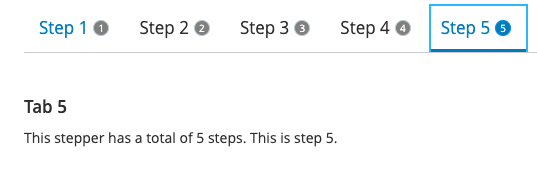
Tecton Tab Container badge
Hi Alan, can you locate your source code so I can investigate it on my end ?
I've tested and it worked just fine with code snippet in the tecton document.
Thanks
Alex
https://cdn1.onlineaccess1.com/cdn/base/tecton/v1.15.1/Documentation/index.html#/ui/q2-tab-container
```
<q2-tab-container name="tab-container" value="tab3">
<q2-tab-pane name="tab-container" value="tab1" label="Step 1" badge-count="1">
<h3>Tab 1</h3>
<p>This stepper has a total of 5 steps. This is step 1.</p>
</q2-tab-pane>
<q2-tab-pane name="tab-container" value="tab2" label="Step 2" badge-count="2">
<h3>Tab 2</h3>
<p>This stepper has a total of 5 steps. This is step 2.</p>
</q2-tab-pane>
<q2-tab-pane name="tab-container" value="tab3" label="Step 3" selected badge-count="3">
<h3>Tab 3</h3>
<p>This stepper has a total of 5 steps. This is step 3.</p>
</q2-tab-pane>
<q2-tab-pane name="tab-container" value="tab4" label="Step 4" badge-count="4">
<h3>Tab 4</h3>
<p>This stepper has a total of 5 steps. This is step 4.</p>
</q2-tab-pane>
<q2-tab-pane name="tab-container" value="tab5" label="Step 5" badge-count="5">
<h3>Tab 5</h3>
<p>This stepper has a total of 5 steps. This is step 5.</p>
</q2-tab-pane>
</q2-tab-container>
```