
Hey Tyler, thanks for replying back to us.
In frontend/public/js/main.js, https://code.q2developer.com/Q2Antilles/visions/visions/-/blob/master/TectonSsrAddressChange/frontend/public/js/main.js?ref_type=heads#L15
Line # 15 (DOMContentLoaded) should be enough over using document.readyState, then "tecton.connected.then"
Let me know how it goes.
Feel free to schedule a call: https://scheduler.zoom.us/alex-jeong/30min-meeting
Thanks
Alex
Hi Bina, currently we don't have a good way to get the checked value with the form submit.
You can listen the select event and store the checked values every time user click the checkboxes
const dt = document.querySelector("your-datatable-selector");
dt.onselect = function(e) {
    console.log(e.detail.id, e.detail.selected);
		// do more stuff like store the values then pass the combined values into the form
}
Also you can still get the values using javascript then you can...
Hi Vivian, thanks for contacting us, but unfortunately Q2 does not provide change the "Enroll" button style in the login page yet. We'll inform if the custom style is available.
Thanks
Alex
Hi Draden, are you still having the issue? I just tried my sandbox but it's pretty fast now.
It also shouldn't be a react code issue. Did you use "q2 create_extension" to scaffold your react app ?
It'll be great if you can provide the source code using gitlab or shared-dev sandbox so I can investigate from my end.
Thanks
Alex
Hi Draden, I can help you on this.
Are you running your extension on your local machine?
I can investigate more detail if you can host it in shared-dev or push it to gitlab if possible so I can look at on my end.
Thanks
Alex
Hi Draden,
You can use a Tecton capability called "setTitle"
tecton.actions.setTitle('');
should remove the title.
You can also change the title using that as well.
https://cdn4.onlineaccess1.com/cdn/base/tecton/v1.25/Documentation/capabilities/setTitle
Let us know if you still have any question.
Thanks
Alex
Hi Jason regarding question #1, geolocation and camera permission are enabled already as default for extensions, do you have any issues with that ? you can just open a sdk ticket so we can track it down.
And regarding question #2, do you use openURL capability to open your external web app with showInOverpanel: true ? we provode setTitle capability so people can set own title on own extension but if it's an external app, we don't support it yet but you can still request a new feature by ope...
Hi Alan, can you locate your source code so I can investigate it on my end ?
I've tested and it worked just fine with code snippet in the tecton document.
Thanks
Alex
https://cdn1.onlineaccess1.com/cdn/base/tecton/v1.15.1/Documentation/index.html#/ui/q2-tab-container
<q2-tab-container name="tab-container" value="tab3">
  <q2-tab-pane name="tab-container" value="tab1" label="Step 1" badge-count="1">
    <h3>Tab 1</h3>
<p>This stepper has a total of 5 steps. This is step 1....Hi David, most of Tecton components are styled with css variables which can be overwritten by theme or even with inline styling such as padding, gap between tabs and bottom border and so on.
For instance, defining this in your css "--comp-container-padding: 5px" should work to modify the padding of UL tag.
But it looks like the margin on top and bottom on ul tag in q2-tab-container's UL tag has default margin and we don't have a css variable defined for the margin unfortunately.
So for no...
Hi Akshay, the question in above for demo purpose.
You can leave the process open even after you exit the terminal.
Try nohup q2 run & , then you can close your terminal or vscode without disconnection,
and the server log will be stored in nohup.out file under sdk folder.
To restart or kill the process, re-visit terminal and use your stack name to find the process.
ps -ef | grep alex.jeong | grep "q2 run" then take the process id and kill
For instance
**ps -ef ...
Hi Akshay, if you want to access your static assets that you added under frontend/assets folder then you would have to access like this in the screenshot, check the red box and yellow box to see how I place the image and access the image on browser.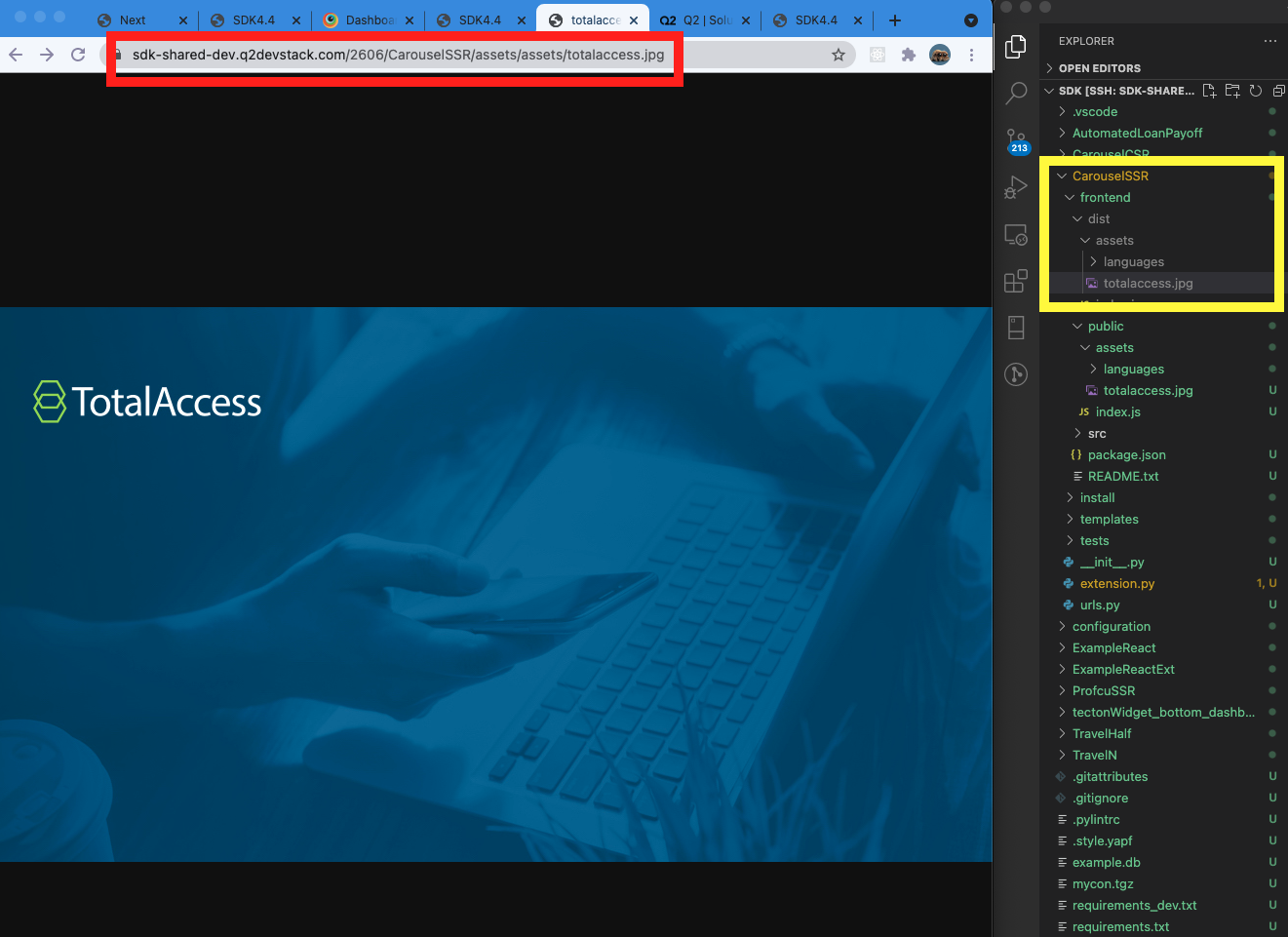
And the reason why you get 405 error is that you don't have default get route handler...