Examples: query, "exact match", wildcard*, wild?ard, wild*rd
Fuzzy search: cake~ (finds cakes, bake)
Term boost: "red velvet"^4, chocolate^2
Field grouping: tags:(+work -"fun-stuff")
Escape special characters +-&|!(){}[]^"~*?:\ - e.g. \+ \* \!
Range search: properties.timestamp:[1587729413488 TO *] (inclusive), properties.title:{A TO Z}(excluding A and Z)
Combinations: chocolate AND vanilla, chocolate OR vanilla, (chocolate OR vanilla) NOT "vanilla pudding"
Field search: properties.title:"The Title" AND text
 
Answered
Style elements inside of the shadow DOM of Tecton Components

Hi,

Any suggestions on the best way to add styles to elements inside of a shadow DOM of a Tecton component.

For example, we're trying to remove the margin on the ul of the tablist when using the q2-tab-container.

Currently we're injecting styles into the shadow root using the following method

//host is the element that holds the shadow root:
var style = document.createElement( 'style' )
style.innerHTML = '.the-class-name { property-name: my-value; }'
host.shadowRoot.appendChild( style )

This works but wondering if there's a more streamlined way to do it.

Posted 3 years ago
0

For what it's worth, I'm using this same approach and it seems to be working alright. Having a different way to do it would be nice, but I'm not sure what the possibilites are on Q2's end.

— Brock Caldwell   3 years ago
Votes Newest

Answers


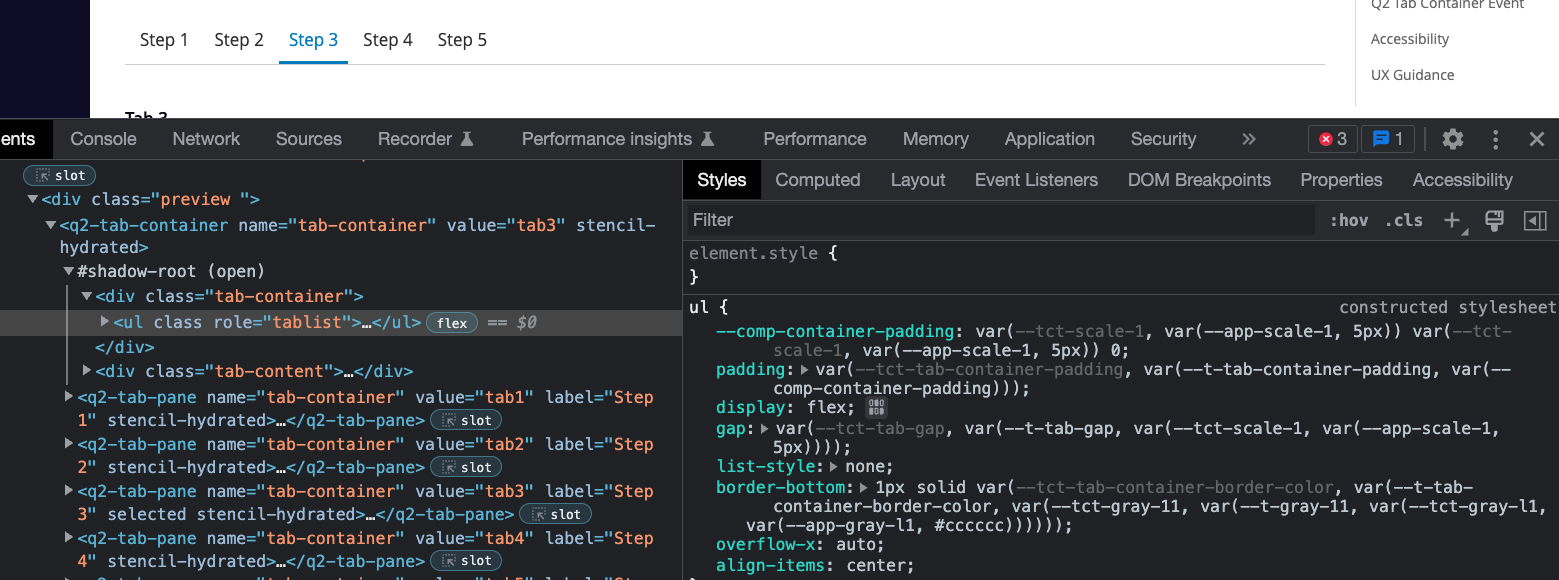
Hi David, most of Tecton components are styled with css variables which can be overwritten by theme or even with inline styling such as padding, gap between tabs and bottom border and so on.
For instance, defining this in your css "--comp-container-padding: 5px" should work to modify the padding of UL tag.
But it looks like the margin on top and bottom on ul tag in q2-tab-container's UL tag has default margin and we don't have a css variable defined for the margin unfortunately.
So for now, your code does the job perfectly with the mannual DOM api javascript, but if you need to change other attributes then you should look for a css variables first.

Let me know if you have any questions.
Thanks
Alex
Screen Shot 2022-12-13 at 11.24.59 AM.png

Posted 3 years ago
Alex Jeong
60 × 1 Administrator
159 Views
1 Answer
3 years ago
3 years ago
Tags