Examples: query, "exact match", wildcard*, wild?ard, wild*rd
Fuzzy search: cake~ (finds cakes, bake)
Term boost: "red velvet"^4, chocolate^2
Field grouping: tags:(+work -"fun-stuff")
Escape special characters +-&|!(){}[]^"~*?:\ - e.g. \+ \* \!
Range search: properties.timestamp:[1587729413488 TO *] (inclusive), properties.title:{A TO Z}(excluding A and Z)
Combinations: chocolate AND vanilla, chocolate OR vanilla, (chocolate OR vanilla) NOT "vanilla pudding"
Field search: properties.title:"The Title" AND text
 
Answered
Datatables styling in Q2

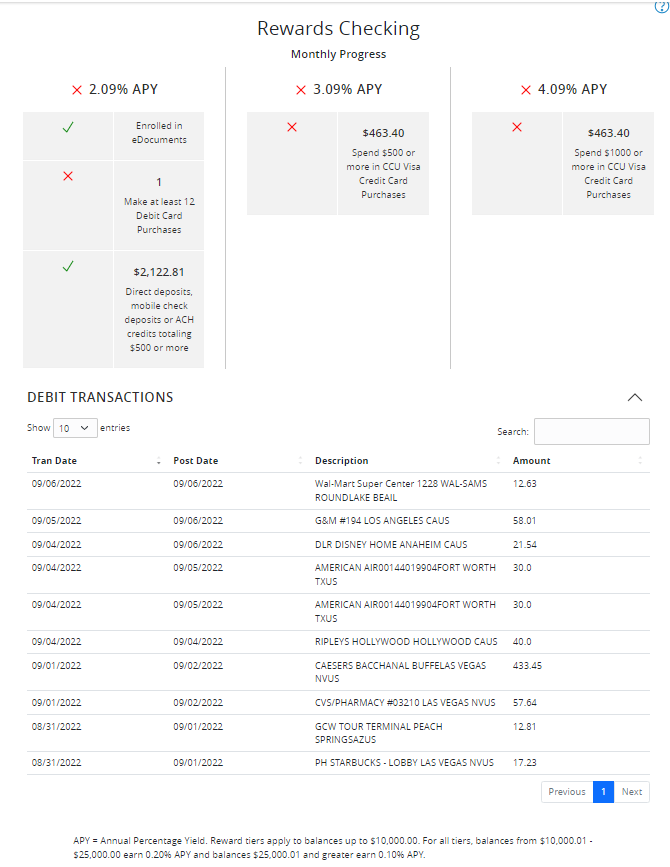
In our rewards tracker tab extension we display which criteria the member has currently met to be at different rewards tiers. One of the criteria is 12 qualifying debit card transactions. We want to fetch and display a list of their monthly qualifying transactions. To display them, I am using a datatable (currently with bootstrap for styling). Is there a standard Q2 styling for datatables, preferably one that matches the transactions table on an account's page? The tecton table documenation is very lacking.

This what I've temporarily created using out-of-the-box bootstrap, but I'd prefer to use a matching Q2 styling.

bootstrap-datatable.png

Votes Newest

Answers


Hey Joshua,

Currently, Tecton does provide some out of the box <table> styling which you can view here.

Basically, you'll just want to wrap your table with a <div class="table-wrapper">, then our styling will take care of the rest.

We have just finalized the designs and implementation notes of an official <q2-table> component which will support many features, but that likely will not be delivered for a few more months.

If you have any questions or run in to any more issues, don't hesitate to reach out. Thanks!

Kris

102 Views
1 Answer
4 years ago
4 years ago
Tags