In UUX version 4.4.0.62 and later, you can add the following property to your configuration object in goes inside the module's config object next to "url"
configuration/ExtensionName.py:
"loadingOptions": {
  "loaders": []
}
This will prevent a spinner from showing at all for that Tecton extension.
If you are not on a new enough version of UUX to support the above feature, you will have to enable the widget for all groups and create a custom User Property that can be used to restrict groups.
In db_plan.py:
        self.user_property_data_elements = [db_plan.UserPropertyDataElement(
            'FeatureGroupCustUser/EnableWidget',
            'Enable Tecton Widget',
            'BOO',
            'Custom',
            True,
            True,
            True
        )]
        self.user_property_data = [db_plan.UserPropertyData('FeatureGroupCustUser/EnableWidget', False)]
In extension.py:
        upd_obj = UserPropertyData(self.logger, hq_credentials=self.hq_credentials)
        upd_get_response = await upd_obj.get('FeatureGroupCustUser/EnableWidget', user_id=self.online_user.user_id,
                                                group_id=self.online_user.group_id, customer_id=self.online_user.customer_id)
        if upd_get_response and upd_get_response[0].PropertyValue.text.lower() == 'true':
            pass
        else:
            return self.get_tecton_form('', hide_submit_button=True)
Adding some extra comments to provide more context and detail.
HOW TO SEE WHAT UUX VERSION YOU ARE USING
Log into your online banking in a web browser, right click and view source.
From there all the CDN assets will have a version tag in it.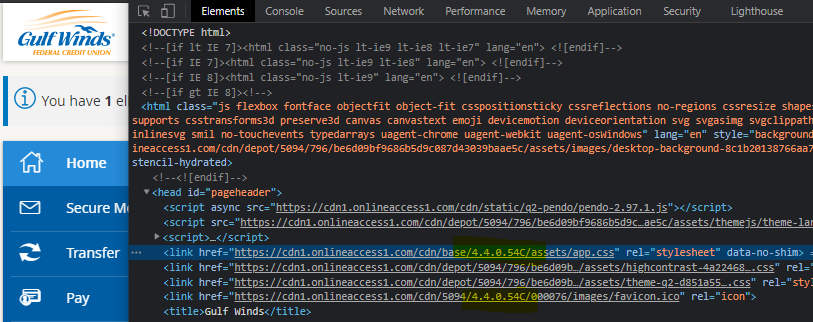
In extension.py:
# remember to import at the top of the file
from q2_sdk.hq.db.user_property_data import UserPropertyData

# check for feature "lookAtThat" inside default method before any other code
    async def default(self):
        # START code from q2 to restrict visibility of this widget
        upd_obj = UserPropertyData(self.logger, hq_credentials=self.hq_credentials)
        upd_get_response = await upd_obj.get('FeatureGroupCustUser/lookAtThat', user_id=self.online_user.user_id,
                                                group_id=self.online_user.group_id, customer_id=self.online_user.customer_id)
        if upd_get_response and upd_get_response[0].PropertyValue.text == 'True':
            pass # user has feature enabled, run the rest of the code
        else:
            return self.get_tecton_form('', hide_submit_button=True) # user does not have feature, return blank html
        # END -----------------------------------------
In db_plan.py:
self.user_property_data_elements = [db_plan.UserPropertyDataElement(
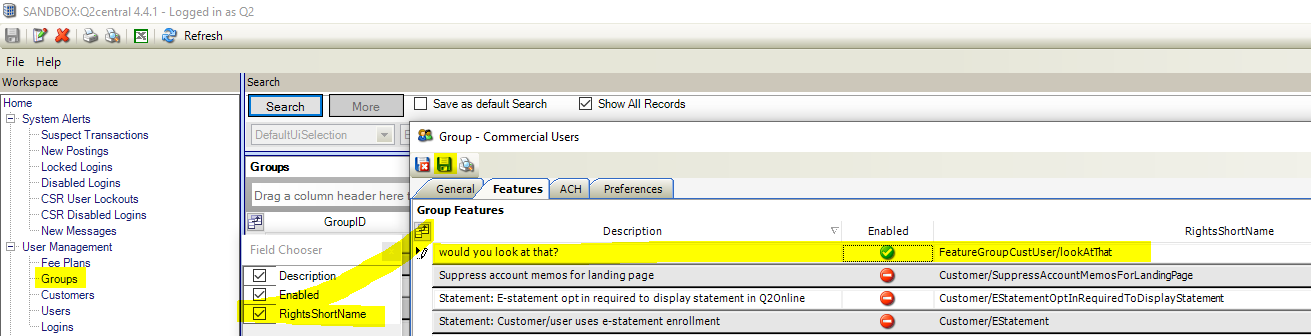
    'FeatureGroupCustUser/lookAtThat',  # shown as RightsShortName in Q2 Central
    'would you look at that?', # shown as Description in Q2 Central
    'BOO',
    'Custom',
    True,
    True,
    True
)]
self.user_property_data = [db_plan.UserPropertyData('FeatureGroupCustUser/lookAtThat', False)]
WHAT THIS CODE DOES
It's adding a new entitlement (permission).
The Q2 platform uses a convention based approach for permissions.
"FeatureGroupCustUser/lookAtThat" means apply the entitlement starting at the group > customer > user
So if "lookAtThat" is true at the group it will be turned on at customer and user levels.
Rename it to something other than "lookAtThat" this value is shown in Q2 Central and having context to what this feature or permission is will be helpful.
AFTER SAVING THE CODE
test this in your sandbox with the command: q2 run_db_plan
adding new entitlements requires invalidating cache with command: q2 invalidate_hq_cache
After invalidating the cache you can login to Q2 Central and enable the feature at the group level