
An extension that I am working on needs to take a document as input so that it can be sent somewhere as an attachment. When looking at the docs, this page is the most relevant: https://docs.q2developer.com/guides/online_integration/file_uploads.html?highlight=upload%20files.
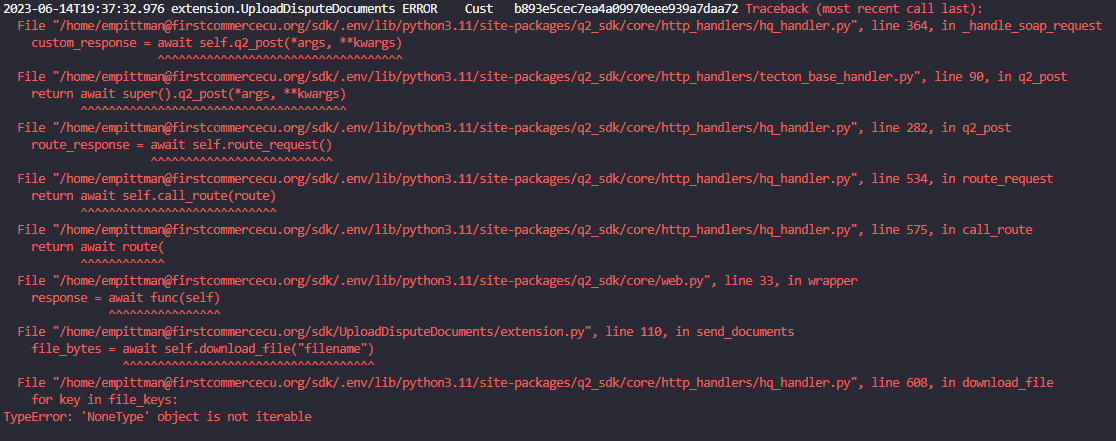
The issue that I am running into is the function `download_file()` does not seem to be working. I am following the instructions exactly how they are typed, but I keep getting the following error: "TypeError: NoneType object is not iterable". I know that there is content in the input box, so I do not uderstand where this error is coming from.
This is the relevant frontend code that I am running.
HTML:
```
<div class="upload-docs-box">
<input type="file" id="filename" name="filename">
</div>
```
JavaScript:
```
window.submitInfo = function submitInfo() {
// Display a loading modal
tecton.actions.showLoadingModal(title = 'Uploading documents...');
tecton.sources.requestExtensionData({
route: 'send_documents',
body: {}
})
.then(response => {
// Get rid of the loading modal
tecton.actions.clearLoadingModal();
alert("File Uploaded")
})
.catch(error => {
// Get rid of loading modal
tecton.actions.clearLoadingModal();
// Display error modal
tecton.actions.showModal({
title: 'Error',
message: 'Something went wrong uploading your documents. Please try again or call our Contact Center for further assistance.',
modalType: 'error',
isBlocking: true
})
});
}
```
Python:
```
@ajax
async def send_documents(self) -> Success:
"""
Send the uploaded dispute documents to the CSRs.
return: Informs the frontend if function was successful and passes info load
"""
file_bytes = await self.download_file('filename')
return Success({})
```
If it is relevant, I am working in the Sandbox and am attempting to upload a .txt file and a .pdf file as tests.
An extension that I am working on needs to take a document as input so that it can be sent somewhere as an attachment. When looking at the docs, this page is the most relevant: https://docs.q2developer.com/guides/online_integration/file_uploads.html?highlight=upload%20files.
The issue that I am running into is the function `download_file()` does not seem to be working. I am following the instructions exactly how they are typed, but I keep getting the following error: "TypeError: NoneType object is not iterable". I know that there is content in the input box, so I do not uderstand where this error is coming from.
This is the relevant frontend code that I am running.
HTML:
```
<div class="upload-docs-box">
<input type="file" id="filename" name="filename">
</div>
```
JavaScript:
```
window.submitInfo = function submitInfo() {
// Display a loading modal
tecton.actions.showLoadingModal(title = 'Uploading documents...');
tecton.sources.requestExtensionData({
route: 'send_documents',
body: {}
})
.then(response => {
// Get rid of the loading modal
tecton.actions.clearLoadingModal();
alert("File Uploaded")
})
.catch(error => {
// Get rid of loading modal
tecton.actions.clearLoadingModal();
// Display error modal
tecton.actions.showModal({
title: 'Error',
message: 'Something went wrong uploading your documents. Please try again or call our Contact Center for further assistance.',
modalType: 'error',
isBlocking: true
})
});
}
```
Python:
```
@ajax
async def send_documents(self) -> Success:
"""
Send the uploaded dispute documents to the CSRs.
return: Informs the frontend if function was successful and passes info load
"""
file_bytes = await self.download_file('filename')
return Success({})
```
If it is relevant, I am working in the Sandbox and am attempting to upload a .txt file and a .pdf file as tests.
How to upload files using download_file()
An extension that I am working on needs to take a document as input so that it can be sent somewhere as an attachment. When looking at the docs, this page is the most relevant: https://docs.q2developer.com/guides/online_integration/file_uploads.html?highlight=upload%20files.
The issue that I am running into is the function `download_file()` does not seem to be working. I am following the instructions exactly how they are typed, but I keep getting the following error: "TypeError: NoneType object is not iterable". I know that there is content in the input box, so I do not uderstand where this error is coming from.
This is the relevant frontend code that I am running.
HTML:
```
<div class="upload-docs-box">
<input type="file" id="filename" name="filename">
</div>
```
JavaScript:
```
window.submitInfo = function submitInfo() {
// Display a loading modal
tecton.actions.showLoadingModal(title = 'Uploading documents...');
tecton.sources.requestExtensionData({
route: 'send_documents',
body: {}
})
.then(response => {
// Get rid of the loading modal
tecton.actions.clearLoadingModal();
alert("File Uploaded")
})
.catch(error => {
// Get rid of loading modal
tecton.actions.clearLoadingModal();
// Display error modal
tecton.actions.showModal({
title: 'Error',
message: 'Something went wrong uploading your documents. Please try again or call our Contact Center for further assistance.',
modalType: 'error',
isBlocking: true
})
});
}
```
Python:
```
@ajax
async def send_documents(self) -> Success:
"""
Send the uploaded dispute documents to the CSRs.
return: Informs the frontend if function was successful and passes info load
"""
file_bytes = await self.download_file('filename')
return Success({})
```
If it is relevant, I am working in the Sandbox and am attempting to upload a .txt file and a .pdf file as tests.