
Good Afternoon,
We use a large font theme on our production and staging environments. We noticed that the theme is not applying to tecton SDK extensions. I believe that this is becuase the Tecton extensions are loaded into an iFrame so the CSS is separated. There is mention of look and feel coming through to the tecton side but would things like font-size be taken into account?
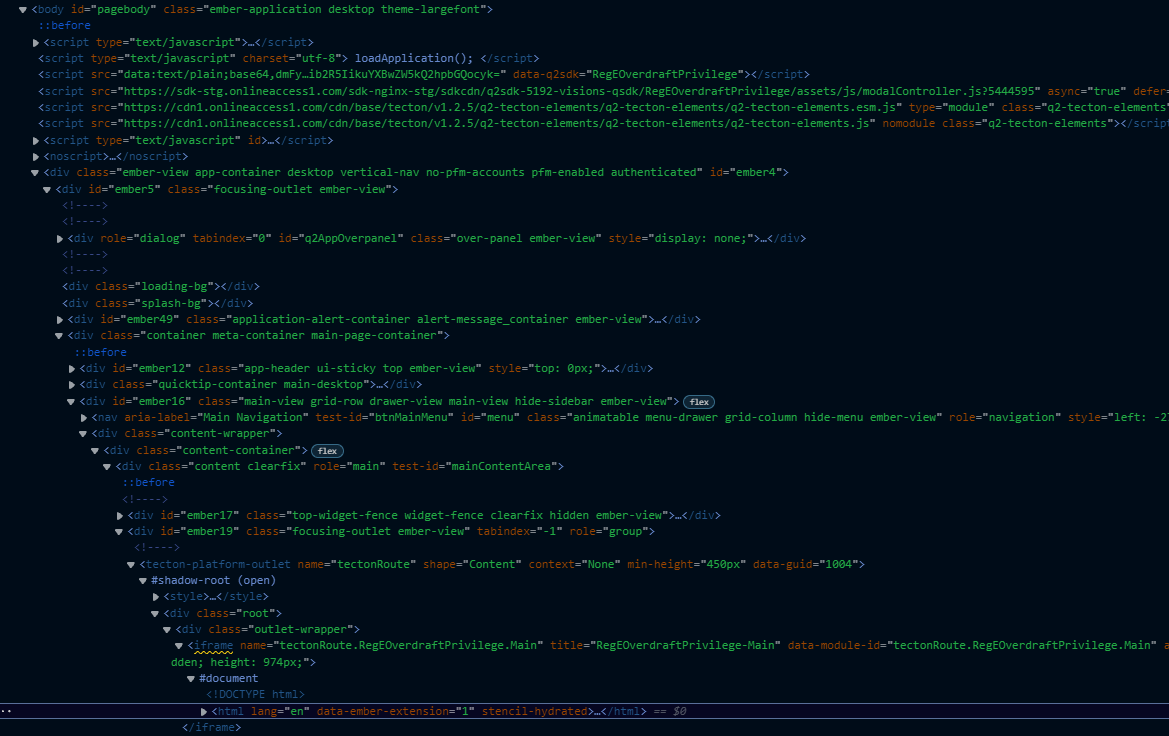
As you can see in the screen shot, the class on the body `theme-largefont` is what applies the overrides in pre-4.4.0 extensions. Since this tecton extension is served via iFrame, the inner style sheet cannot know that the theme is large font. Is there a way to have our outer large font theme apply to the text inside our tecton extension?
Good Afternoon,
We use a large font theme on our production and staging environments. We noticed that the theme is not applying to tecton SDK extensions. I believe that this is becuase the Tecton extensions are loaded into an iFrame so the CSS is separated. There is mention of look and feel coming through to the tecton side but would things like font-size be taken into account?

As you can see in the screen shot, the class on the body `theme-largefont` is what applies the overrides in pre-4.4.0 extensions. Since this tecton extension is served via iFrame, the inner style sheet cannot know that the theme is large font. Is there a way to have our outer large font theme apply to the text inside our tecton extension?
Tecton Extensions and Production/Staging themes
Good Afternoon,
We use a large font theme on our production and staging environments. We noticed that the theme is not applying to tecton SDK extensions. I believe that this is becuase the Tecton extensions are loaded into an iFrame so the CSS is separated. There is mention of look and feel coming through to the tecton side but would things like font-size be taken into account?

As you can see in the screen shot, the class on the body `theme-largefont` is what applies the overrides in pre-4.4.0 extensions. Since this tecton extension is served via iFrame, the inner style sheet cannot know that the theme is large font. Is there a way to have our outer large font theme apply to the text inside our tecton extension?