
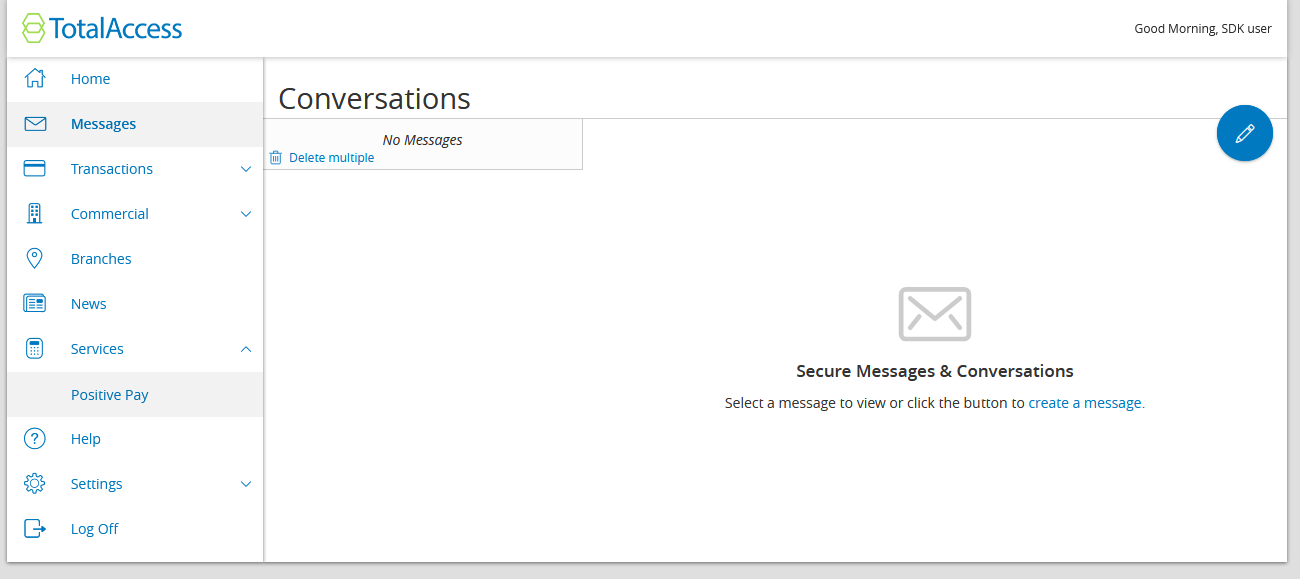
I'm stepping through the Hello World example but have been stuck on the add to navigation step. Everything on the command line seems to work perfectly yet my extension is not appearing on Total Access.
Here are my steps (following the tutorial):
```
$ q2 create_extension AccountDashboard
...
$ q2 install
$ q2 add_to_nav
$ q2 run
```
Here is some output from q2 add_to_nav
```
(.env) ben.s@zogofinance.com@shared-dev-machine2:~/sdk$ q2 add_to_nav
Which extension would you like to add to navigation menu?
1) Policy
2) AlternativeNavigationTCT_services
3) AlternativeNavigationTCT_settings
4) AlternativeNavigationTCT_transfers
5) AccountDashboard
6) AccountDashboardAll
Please make a selection and press Return: 5
AccountDashboard
Which menu should this nav node live under? (Leave blank to insert at top level nav)
--Online Top Level Navigation Menu--
1) Home
2) Home
3) not used
4) Messages
5) Tranfers & Payments
6) not used
7) Transactions
8) Commercial
9) not used
10) not used
11) Branches
12) Services
Page 1 of 3. Select 'n' for next page.
Please make a selection and press Return: n
Which menu should this nav node live under? (Leave blank to insert at top level nav)
--Online Top Level Navigation Menu--
1) not used
2) News
3) Reports
4) not used
5) Settings
6) not used
7) Services
8) Help
9) not used
10) Settings
11) Home
12) Transfer
Page 2 of 3. Select 'n' for next page or 'p' for previous page.
Please make a selection and press Return: 7
Services
--Services--
1) -> here
Stop Payment
2) -> here
Positive Pay
3) -> here
SDK: AccountDashboardAll <--- From a previous attempt
4) -> here
Where should this nav node appear in the submenu?:
```
Then I check https://stack.q2developer.com/sdk/zogofinance/ardent/uux.aspx#/landingPage but nothing appears. What am I not seeing? Thanks
I'm stepping through the Hello World example but have been stuck on the add to navigation step. Everything on the command line seems to work perfectly yet my extension is not appearing on Total Access.
Here are my steps (following the tutorial):
```
$ q2 create_extension AccountDashboard
...
$ q2 install
$ q2 add_to_nav
$ q2 run
```
Here is some output from q2 add_to_nav
```
(.env) ben.s@zogofinance.com@shared-dev-machine2:~/sdk$ q2 add_to_nav
Which extension would you like to add to navigation menu?
1) Policy
2) AlternativeNavigationTCT_services
3) AlternativeNavigationTCT_settings
4) AlternativeNavigationTCT_transfers
5) AccountDashboard
6) AccountDashboardAll
Please make a selection and press Return: 5
AccountDashboard
Which menu should this nav node live under? (Leave blank to insert at top level nav)
--Online Top Level Navigation Menu--
1) Home
2) Home
3) not used
4) Messages
5) Tranfers & Payments
6) not used
7) Transactions
8) Commercial
9) not used
10) not used
11) Branches
12) Services
Page 1 of 3. Select 'n' for next page.
Please make a selection and press Return: n
Which menu should this nav node live under? (Leave blank to insert at top level nav)
--Online Top Level Navigation Menu--
1) not used
2) News
3) Reports
4) not used
5) Settings
6) not used
7) Services
8) Help
9) not used
10) Settings
11) Home
12) Transfer
Page 2 of 3. Select 'n' for next page or 'p' for previous page.
Please make a selection and press Return: 7
Services
--Services--
1) -> here
Stop Payment
2) -> here
Positive Pay
3) -> here
SDK: AccountDashboardAll <--- From a previous attempt
4) -> here
Where should this nav node appear in the submenu?:
```
Then I check https://stack.q2developer.com/sdk/zogofinance/ardent/uux.aspx#/landingPage but nothing appears. What am I not seeing? Thanks
Add to Nav?
Add to Nav?
I'm stepping through the Hello World example but have been stuck on the add to navigation step. Everything on the command line seems to work perfectly yet my extension is not appearing on Total Access.
Here are my steps (following the tutorial):
```
$ q2 create_extension AccountDashboard
...
$ q2 install
$ q2 add_to_nav
$ q2 run
```
Here is some output from q2 add_to_nav
```
(.env) ben.s@zogofinance.com@shared-dev-machine2:~/sdk$ q2 add_to_nav
Which extension would you like to add to navigation menu?
1) Policy
2) AlternativeNavigationTCT_services
3) AlternativeNavigationTCT_settings
4) AlternativeNavigationTCT_transfers
5) AccountDashboard
6) AccountDashboardAll
Please make a selection and press Return: 5
AccountDashboard
Which menu should this nav node live under? (Leave blank to insert at top level nav)
--Online Top Level Navigation Menu--
1) Home
2) Home
3) not used
4) Messages
5) Tranfers & Payments
6) not used
7) Transactions
8) Commercial
9) not used
10) not used
11) Branches
12) Services
Page 1 of 3. Select 'n' for next page.
Please make a selection and press Return: n
Which menu should this nav node live under? (Leave blank to insert at top level nav)
--Online Top Level Navigation Menu--
1) not used
2) News
3) Reports
4) not used
5) Settings
6) not used
7) Services
8) Help
9) not used
10) Settings
11) Home
12) Transfer
Page 2 of 3. Select 'n' for next page or 'p' for previous page.
Please make a selection and press Return: 7
Services
--Services--
1) -> here
Stop Payment
2) -> here
Positive Pay
3) -> here
SDK: AccountDashboardAll <--- From a previous attempt
4) -> here
Where should this nav node appear in the submenu?:
```
Then I check https://stack.q2developer.com/sdk/zogofinance/ardent/uux.aspx#/landingPage but nothing appears. What am I not seeing? Thanks
I'm stepping through the Hello World example but have been stuck on the add to navigation step. Everything on the command line seems to work perfectly yet my extension is not appearing on Total Access.
I follow the tutorial then I check https://stack.q2developer.com/sdk/zogofinance/ardent/uux.aspx#/landingPage but nothing appears. What am I not seeing? Thanks
Here are my steps:
```
$ q2 create_extension AccountDashboard
...
$ q2 install
$ q2 add_to_nav
$ q2 run
```
Here is some output from q2 add_to_nav
```
(.env) ben.s@zogofinance.com@shared-dev-machine2:~/sdk$ q2 add_to_nav
Which extension would you like to add to navigation menu?
1) Policy
2) AlternativeNavigationTCT_services
3) AlternativeNavigationTCT_settings
4) AlternativeNavigationTCT_transfers
5) AccountDashboard
6) AccountDashboardAll
Please make a selection and press Return: 5
AccountDashboard
Which menu should this nav node live under? (Leave blank to insert at top level nav)
--Online Top Level Navigation Menu--
1) Home
2) Home
3) not used
4) Messages
5) Tranfers & Payments
6) not used
7) Transactions
8) Commercial
9) not used
10) not used
11) Branches
12) Services
Page 1 of 3. Select 'n' for next page.
Please make a selection and press Return: n
Which menu should this nav node live under? (Leave blank to insert at top level nav)
--Online Top Level Navigation Menu--
1) not used
2) News
3) Reports
4) not used
5) Settings
6) not used
7) Services
8) Help
9) not used
10) Settings
11) Home
12) Transfer
Page 2 of 3. Select 'n' for next page or 'p' for previous page.
Please make a selection and press Return: 7
Services
--Services--
1) -> here
Stop Payment
2) -> here
Positive Pay
3) -> here
SDK: AccountDashboardAll <--- From a previous attempt
4) -> here
Where should this nav node appear in the submenu?:
```

#question
I'm stepping through the Hello World example but have been stuck on the add to navigation step. Everything on the command line seems to work perfectly yet my extension is not appearing on Total Access.
I follow the tutorial then I check https://stack.q2developer.com/sdk/zogofinance/ardent/uux.aspx#/landingPage but nothing appears. What am I not seeing? Thanks
Here are my steps:
```
$ q2 create_extension AccountDashboard
...
$ q2 install
$ q2 add_to_nav
$ q2 run
```
Here is some output from q2 add_to_nav
```
(.env) ben.s@zogofinance.com@shared-dev-machine2:~/sdk$ q2 add_to_nav
Which extension would you like to add to navigation menu?
1) Policy
2) AlternativeNavigationTCT_services
3) AlternativeNavigationTCT_settings
4) AlternativeNavigationTCT_transfers
5) AccountDashboard
6) AccountDashboardAll
Please make a selection and press Return: 5
AccountDashboard
Which menu should this nav node live under? (Leave blank to insert at top level nav)
--Online Top Level Navigation Menu--
1) Home
2) Home
3) not used
4) Messages
5) Tranfers & Payments
6) not used
7) Transactions
8) Commercial
9) not used
10) not used
11) Branches
12) Services
Page 1 of 3. Select 'n' for next page.
Please make a selection and press Return: n
Which menu should this nav node live under? (Leave blank to insert at top level nav)
--Online Top Level Navigation Menu--
1) not used
2) News
3) Reports
4) not used
5) Settings
6) not used
7) Services
8) Help
9) not used
10) Settings
11) Home
12) Transfer
Page 2 of 3. Select 'n' for next page or 'p' for previous page.
Please make a selection and press Return: 7
Services
--Services--
1) -> here
Stop Payment
2) -> here
Positive Pay
3) -> here
SDK: AccountDashboardAll <--- From a previous attempt
4) -> here
Where should this nav node appear in the submenu?:
```

I'm stepping through the Hello World example but have been stuck on the add to navigation step. Everything on the command line seems to work perfectly yet my extension is not appearing on Total Access.
I follow the tutorial then I check https://stack.q2developer.com/sdk/zogofinance/ardent/uux.aspx#/landingPage but nothing appears. What am I not seeing? Thanks
Here are my steps:
```
$ q2 create_extension AccountDashboard
...
$ q2 install
$ q2 add_to_nav
$ q2 run
```
Here is some output from q2 add_to_nav
```
(.env) ben.sauskojus@zogofinance.com@shared-dev-machine2:~/sdk$ q2 add_to_nav
Which extension would you like to add to navigation menu?
1) Policy
2) AlternativeNavigationTCT_services
3) AlternativeNavigationTCT_settings
4) AlternativeNavigationTCT_transfers
5) AccountDashboard
6) AccountDashboardAll
Please make a selection and press Return: 5
AccountDashboard
Which menu should this nav node live under? (Leave blank to insert at top level nav)
--Online Top Level Navigation Menu--
1) Home
2) Home
3) not used
4) Messages
5) Tranfers & Payments
6) not used
7) Transactions
8) Commercial
9) not used
10) not used
11) Branches
12) Services
Page 1 of 3. Select 'n' for next page.
Please make a selection and press Return: n
Which menu should this nav node live under? (Leave blank to insert at top level nav)
--Online Top Level Navigation Menu--
1) not used
2) News
3) Reports
4) not used
5) Settings
6) not used
7) Services
8) Help
9) not used
10) Settings
11) Home
12) Transfer
Page 2 of 3. Select 'n' for next page or 'p' for previous page.
Please make a selection and press Return: 7
Services
--Services--
1) -> here
Stop Payment
2) -> here
Positive Pay
3) -> here
SDK: AccountDashboardAll <--- From a previous attempt
4) -> here
Where should this nav node appear in the submenu?:
```

Add to Nav?
I'm stepping through the Hello World example but have been stuck on the add to navigation step. Everything on the command line seems to work perfectly yet my extension is not appearing on Total Access.
I follow the tutorial then I check https://stack.q2developer.com/sdk/zogofinance/ardent/uux.aspx#/landingPage but nothing appears. What am I not seeing? Thanks
Here are my steps:
```
$ q2 create_extension AccountDashboard
...
$ q2 install
$ q2 add_to_nav
$ q2 run
```
Here is some output from q2 add_to_nav
```
(.env) ben.sauskojus@zogofinance.com@shared-dev-machine2:~/sdk$ q2 add_to_nav
Which extension would you like to add to navigation menu?
1) Policy
2) AlternativeNavigationTCT_services
3) AlternativeNavigationTCT_settings
4) AlternativeNavigationTCT_transfers
5) AccountDashboard
6) AccountDashboardAll
Please make a selection and press Return: 5
AccountDashboard
Which menu should this nav node live under? (Leave blank to insert at top level nav)
--Online Top Level Navigation Menu--
1) Home
2) Home
3) not used
4) Messages
5) Tranfers & Payments
6) not used
7) Transactions
8) Commercial
9) not used
10) not used
11) Branches
12) Services
Page 1 of 3. Select 'n' for next page.
Please make a selection and press Return: n
Which menu should this nav node live under? (Leave blank to insert at top level nav)
--Online Top Level Navigation Menu--
1) not used
2) News
3) Reports
4) not used
5) Settings
6) not used
7) Services
8) Help
9) not used
10) Settings
11) Home
12) Transfer
Page 2 of 3. Select 'n' for next page or 'p' for previous page.
Please make a selection and press Return: 7
Services
--Services--
1) -> here
Stop Payment
2) -> here
Positive Pay
3) -> here
SDK: AccountDashboardAll <--- From a previous attempt
4) -> here
Where should this nav node appear in the submenu?:
```
