
If the Financial Instutition wants to use (and has) Pendo Analytics or Q2 Discover, this will be taken care of automatically with the Tecton javascript library, no further work is needed to initialize Pendo and get the basic page/url level tracking. The data will only be visible if your Financial Instutition has purchased either Pendo or Q2 Discover. If you do not have either of those products, your FI should reach out to their Q2 Relationship Team for more details.
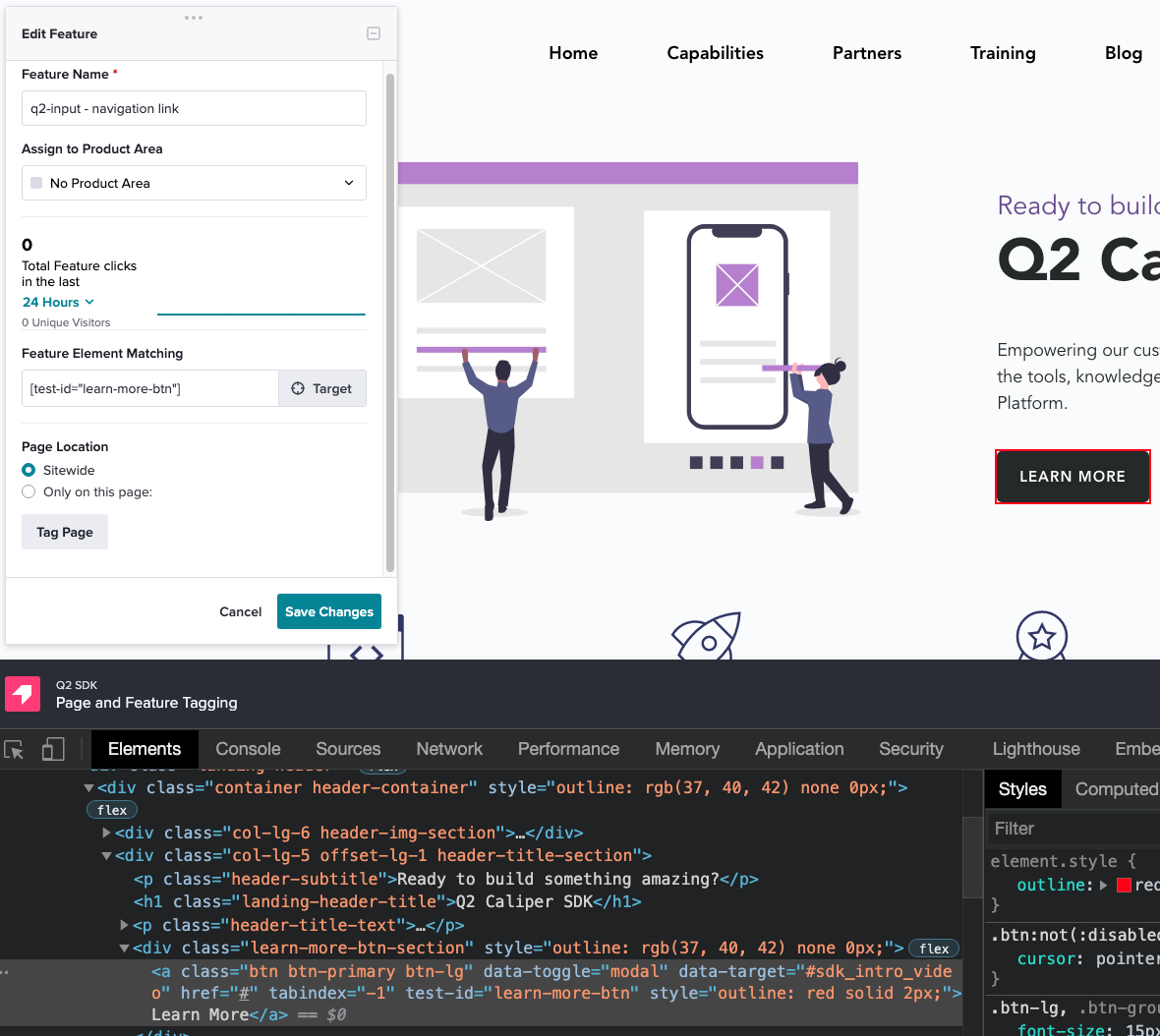
As far as getting "feature" level tracking (buttons, clicks, inputs, etc) you will need to consider how the elements you want to track will be selected in the DOM. The Pendo Designer works off of CSS selectors. It is considered best practice to have explicit identifiers on the elements you want to track. This can be done by setting the "id" attribute on those elements or by coming up with a different id convention. For reference, Q2 uses a "test-id" attribute on all of its elements. You can use this as well if you don't want to use the "id" attribute. Remember to make these unique so there are not multiple elements with the same ID in the DOM at the same time.
Here is a picture of how the Pendo Designer works:
For financial instutitions that do not have Pendo/Discover or want to use something different that is fully possible. You can include other analytics javascript snippets in your extensions. Alternatively if you want to send analytics from the server side (python) to an API that could work as well.
Lastly, if you want to capture some data about usage into the Q2 DB and then report it through a Q2Central/Q2Console SDK extension, you could build something like that as well.
This will be taken care of automatically with the Tecton javascript library, no further work is needed to initialize Pendo and get the basic page/url level tracking. The data will only be visible if your Financial Instutition has purchased either Pendo or Q2 Discover. If you do not have either of those products, your FI should reach out to their Q2 Relationship Team for more details.
As far as getting "feature" level tracking (buttons, clicks, inputs, etc) you will need to consider how the elements you want to track will be selected in the DOM. The Pendo Designer works off of CSS selectors. It is considered best practice to have explicit identifiers on the elements you want to track. This can be done by setting the "id" attribute on those elements or by coming up with a different id convention. For reference, Q2 uses a "test-id" attribute on all of its elements. You can use this as well if you don't want to use the "id" attribute. Remember to make these unique so there are not multiple elements with the same ID in the DOM at the same time.
Here is a picture of how the Pendo Designer works:

How can I track the usage of my extensions?
This will be taken care of automatically with the Tecton javascript library, no further work is needed to initialize Pendo and get the basic page/url level tracking. The data will only be visible if your Financial Instutition has purchased either Pendo or Q2 Discover. If you do not have either of those products, your FI should reach out to their Q2 Relationship Team for more details.
As far as getting "feature" level tracking (buttons, clicks, inputs, etc) you will need to consider how the elements you want to track will be selected in the DOM. The Pendo Designer works off of CSS selectors. It is considered best practice to have explicit identifiers on the elements you want to track. This can be done by setting the "id" attribute on those elements or by coming up with a different id convention. For reference, Q2 uses a "test-id" attribute on all of its elements. You can use this as well if you don't want to use the "id" attribute. Remember to make these unique so there are not multiple elements with the same ID in the DOM at the same time.
Here is a picture of how the Pendo Designer works:
