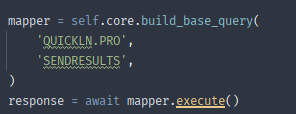
Hi Khalil,
It sounds like you have a good grasp of what to do, already. You are correct, you do need the repgen name and the procedure. In order to do good testing in dev, you probably also want to build and pass a mock string to the function as well so that you can handle a complete flow, even in development. If your repgen takes other parameters, you can pass those as well. Here is an example of a what a more complete call might look like:
mock_str = """RSRG~2f5342b6-c5f7-4160-s49d-8431k9c7d8f1~K0~JRGLINE=DATAFILENAME=CORE.OVERDRFT.STAT.xxxxxxxxxx~JRGDATATYPE=9
<OVRDRFTCHANGE>
    <ID>01</ID>
    <SUCCESS>TRUE</SUCCESS>
    <STATUS>EXTENDED</STATUS>
</OVRDRFTCHANGE>"""

status_str = "EXT"

# Set up input values for UPDTESTA query to core
rg_params = {
		'RGUSERNUM1': "01",
		'RGUSERCHR1': status_str,
		'RGUSERCHR2': self.online_user.first_name,
		'RGUSERCHR3': self.online_user.last_name
}

# Generate UPDATESTATUS query to the core
query = await self.core.build_base_query(
		"CORE.OVERDRFT.STAT",
		"UPDTESTA",
		member_number=self.online_user.user_primary_cif,
		rg_params=rg_params,
		mock_response_string=mock_response
)

# Call UPDTESTA query
status_change_resp = await query.execute()

# Do something more relevant than this with response based on your use case
self.log(f"Core response: {status_change_resp.raw}")
Definitely also check out the docs and source for the function (which it sounds like you may already have!):
I hope that helps,
Dan